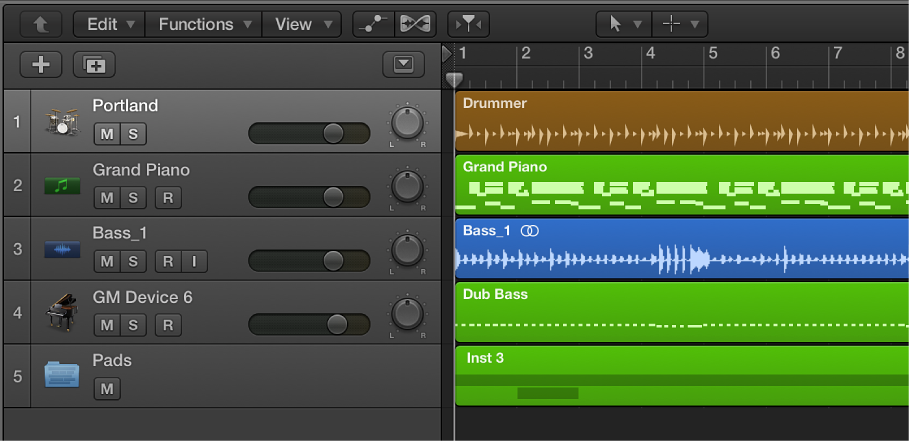

Tracks help you organize and control the sound of the recordings and other material in a project. You record and arrange audio and MIDI regions on tracks in the Tracks area. Each track is assigned to a channel strip in the Mixer.
A Logic Pro project can include the following track types:
Audio tracks: Contain audio regions from audio recordings, audio Apple Loops, and imported audio files.
Software instrument tracks: Contain MIDI regions from software instrument recordings, software instrument Apple Loops, and imported MIDI files.
Drummer tracks: Behave like software instrument tracks, but with no MIDI input. Drummer tracks support the Drum Kit Designer plug-in so you can add virtual drummers to your projects. For more information, see Drummer overview.
External MIDI tracks: Contain MIDI regions that send MIDI data to an external MIDI device.
Folder tracks: Contain folders, which are containers for multiple tracks and regions. Unlike other tracks, folder tracks are not assigned to a channel strip in the Mixer.
Each track has a track header located to the left of the track, which shows the track’s name and icon. Track headers also contain controls that you can use to mute, solo, and adjust the volume level and pan position of the track, and control the track in other ways.
When you create a track, you choose the track type, format, and output. You can also choose a patch, which controls the sound of the track.
You can use Track Stacks to organize projects with high track counts, and simplify the creation of audio subgroups for related tracks. There are several different types of Track Stacks, designed for different situations.
You can edit track parameters for the selected track in the Track inspector.
Additionally, there are two other track types with specific functions: global tracks, and the master track.
Global tracks: These tracks, which appear below the ruler in the Tracks area and in linear editors, are used to view and edit different aspects of the overall project, such as tempo, which affect all tracks in the project. For information about global tracks, see Global tracks overview.
Master track: When you show the master track, it appears below all other tracks in the Tracks area. For information about the master track, see Work with the master track.