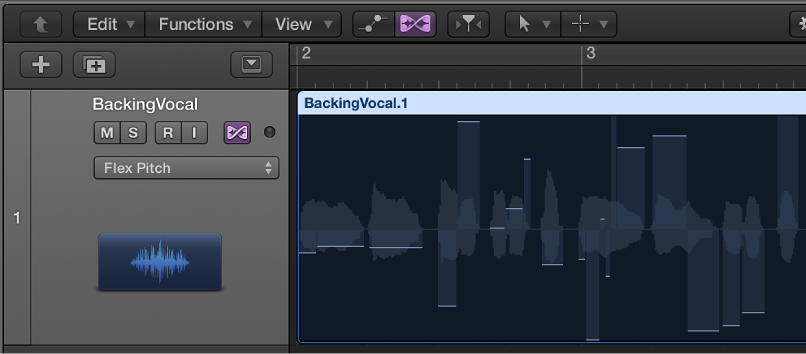

When you choose Flex Pitch for a track in the Tracks area, but you haven’t zoomed into the track all the way, you don’t have access to all the Flex Pitch parameters you do when the track is zoomed. Instead, you are shown the pitch deviation of individual notes from their perfect semitone as bars overlaying the audio waveform in the background.
The horizontal zero line represents the perfect pitch.
Upward bars represent sharp notes.
Downward bars represent flat notes.
The horizontal size of bars represents the length of detected notes.
The vertical display range is ±0.50 cents.
If you want to move notes in time, you should use the Audio Track Editor.
 Flex Pitch is only available in the Tracks area, when Show Advanced Tools is selected in the Advanced preferences pane.
Drag the bar toward the zero line.
You can adjust the pitch within the range ±0.50 cents.
Drag the part of the bar on the zero line away from the line.
Do one of the following:
Control-click an individual bar, then choose Set to Perfect Pitch from the shortcut menu.
Control-click the audio region, then choose Set all to Perfect Pitch from the shortcut menu.
Do one of the following:
Double-click the bar.
Control-click an individual bar, then choose Set to Original Pitch from the shortcut menu.
Control-click the audio region, then choose Set All to Original Pitch from the shortcut menu.