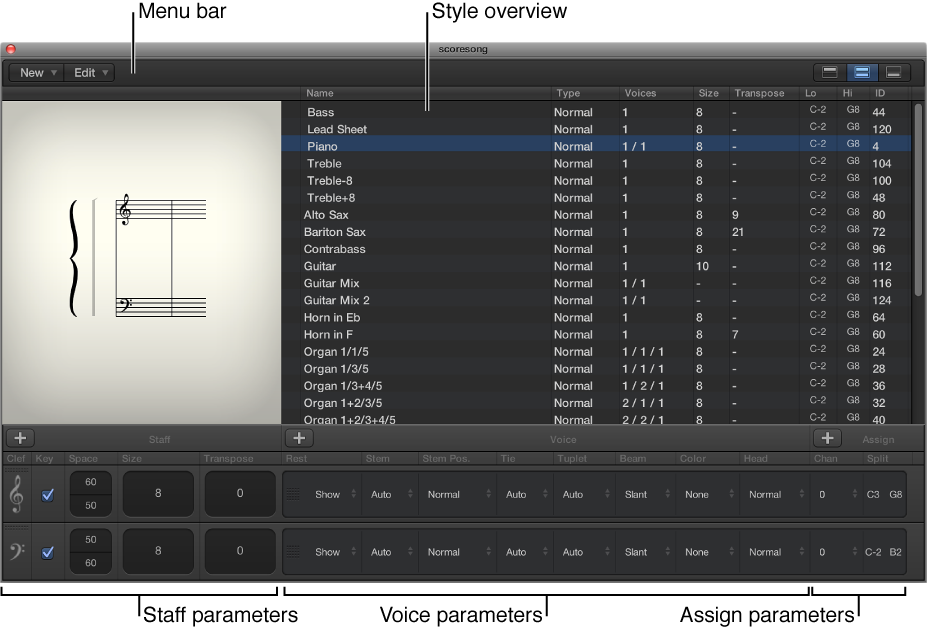

You view and edit staff style parameters in the Staff Style window. The upper part of the window shows a list of available staff styles, with a visual representation of the selected staff style. The lower part shows the staffs that are used for the selected staff style, with parameters for each staff. The voices used for each staff are listed to the right.
The main elements of the window include:
Menu bar: Contains the local New, Edit, and View menus, and the View buttons to hide or show different parts of the Staff Style window.
Style overview: Shows a list of available staff styles with the type, number of voices, and other parameters for each listed staff style, and a graphical representation of the selected style that updates to reflect your edits to the style.
Staff parameters: Shows the parameters for each staff in the selected staff style. Parameters for each staff are shown as one row.
Voice parameters: Shows the parameters for independent voices. Parameters for each voice are shown as one row. Each voice can be displayed as a rhythmically independent, polyphonic passage in the music. A voice can consist of as many simultaneous notes (chords) as needed.
Assign parameters: Shows the parameters for assigning notes to different voices. Every staff can contain up to 16 independent voices, but each voice can be displayed on only one staff. (Consequently, a staff style must contain at least as many voices as staffs.)
You can show the entire Staff Style window, or only part of the window, using the View buttons on the right side of the menu bar.
Do one of the following:
Choose Layout > Staff Styles (or use the Show/Hide Staff Style Window key command).
Double-click a staff in the score.
Do one of the following:
To show only the style overview (upper part of the window): Click the left View button.
To show the complete contents (both parts) of the window: Click the center View button.
To show only the staff and voice parameters (lower part of the window): Click the right View button.