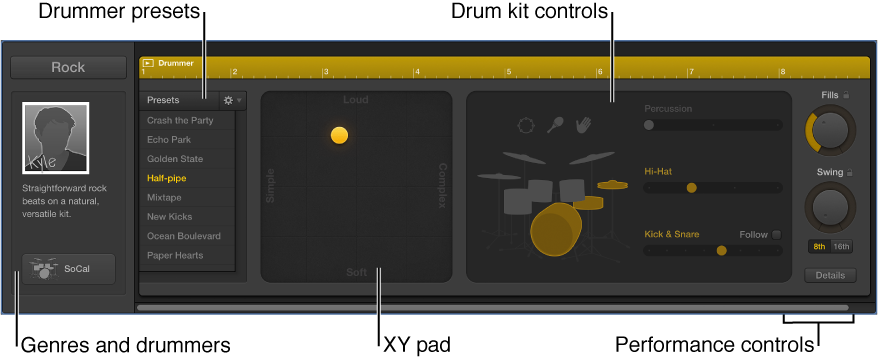

If you add a Drummer track to a project, you can view and edit Drummer track and region parameters in the Drummer Editor.
The left side of the Drummer Editor shows settings for the Drummer track, including genres and drummers. On the right side are parameters for the selected Drummer region, including presets, an XY pad for adjusting the complexity and loudness of the region performance, and controls for editing performance parameters, including kit piece pattern variations and fill settings.
Genres and drummers: Select a genre to view the drummers for that genre, then select the drummer for the track.
Drummer presets: Choose a preset for the selected Drummer region. A preset consists of all region settings, visible to the right of the presets area. You can use the default settings, or you can edit them and save your own presets.
XY pad: Adjust the complexity and loudness of the region performance.
Drum kit controls: Turn on different instruments, and choose between different variations for the drum and percussion pieces. You also have the option to play half time or double time for kick and snare.
Performance controls: Adjust the number and length of fills using the Fills knob. Adjust the shuffle feel of the region performance using the Swing knob. Click the Details button to reveal additional performance controls.
Do one of the following:
Double-click a Drummer region on a Drummer track.
Select one or more Drummer regions on a Drummer track, then click the Editors button  in the control bar.
Select a Drummer track, then click the Editors button .
The Drummer Editor opens below the Tracks area.