The Audio File Editor is only available when Additional Options for both Audio and Advanced editing are selected in the Advanced preferences pane. It displays the audio waveform of regions on an audio track. In the Audio File Editor, you can destructively edit audio files (and regions), and use audio processing tools to quantize audio, change sample rates, and extract MIDI grooves from audio files.
The Audio File Editor has its own ruler, playhead, and zoom slider.
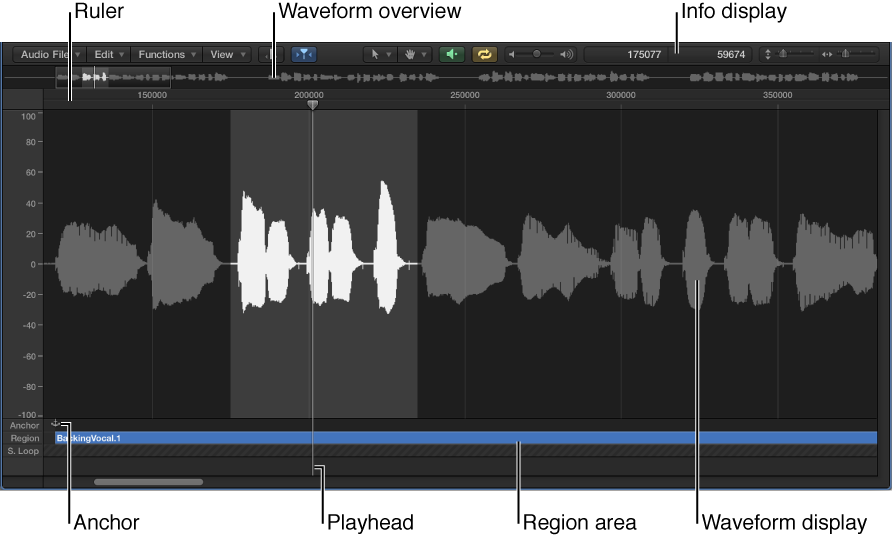
Ruler: Indicates the position and length of the region selected in the Tracks area, or in the Project Audio Browser.
Info display: Displays the start point and length of the selected area.
Waveform overview: Displays a miniature view of the entire audio waveform.
Waveform display: Provides a detailed view of the area selected in the waveform overview.
Playhead: Reflects the current playback position.
Anchor: Displays the absolute start point of the audio file.
Region area: Edit this beam to adjust the region length.
Open the Audio File Editor
Do one of the following:
Select an audio region, then choose Window > Open Audio File Editor (or press Command-6).
Option-double-click an audio region in the Project Audio Browser.

 The Audio File Editor is only available when Additional Options for both Audio and Advanced editing are selected in the Advanced preferences pane. It displays the audio waveform of regions on an audio track. In the Audio File Editor, you can destructively edit audio files (and regions), and use audio processing tools to quantize audio, change sample rates, and extract MIDI grooves from audio files.