 You can filter channel strips by type when Show Advanced Tools is selected in the Advanced preferences pane, displaying only those channel strips that you need for the task at hand.
You use channel strips to process audio or MIDI information that is routed from tracks. The Mixer shows all channel strips in your project, including track channel strips, auxiliary and output channel strips, VCA channel strips, and the master channel strip.
You can filter channel strips by type when Show Advanced Tools is selected in the Advanced preferences pane, displaying only those channel strips that you need for the task at hand.
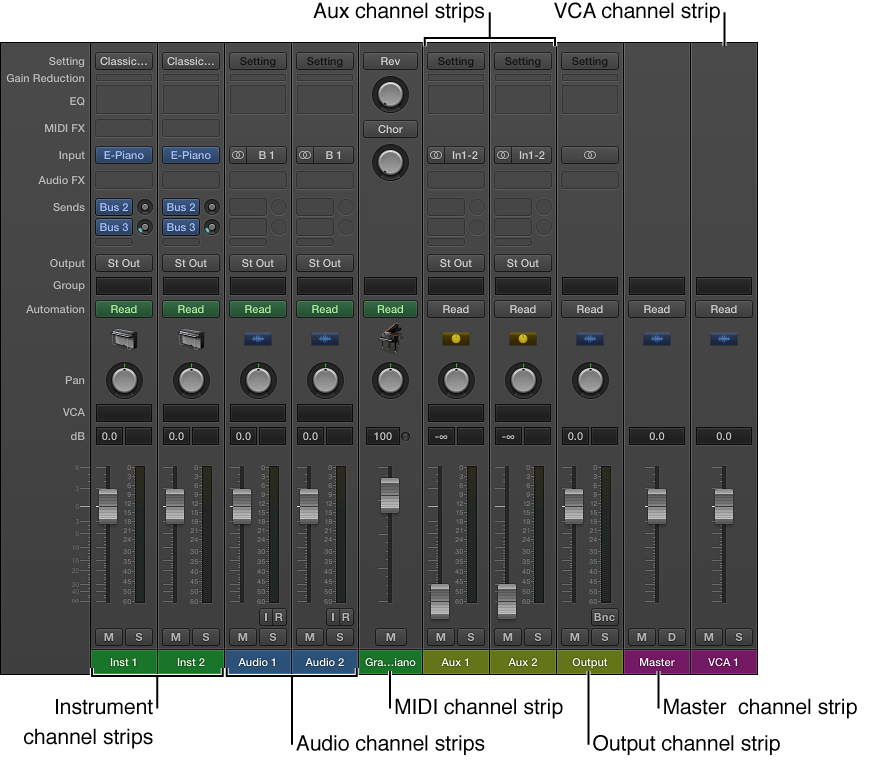
Audio channel strips: Used to control the playback and recording of audio signals on audio tracks. All data on the audio track is automatically routed to the audio channel strip assigned in the track list.
Instrument channel strips: Used to control software instruments. Software instruments are inserted via the channel strip’s Instrument slot. The instrument channel strip can then be driven by a recorded MIDI region, or by playing your MIDI keyboard.
Aux (Auxiliary) channel strips: Used for a variety of signal-routing purposes. Aux channel strips are used to set up send returns, where a channel strip signal is routed to an aux channel strip for effects processing. They are also used for grouping and for distributing a signal to multiple destinations via sends.
Output channel strips: Represent the physical audio outputs of your audio interface. They are used to adjust the overall level and stereo balance—or pan position, in the case of mono output channel strips—of all audio, instrument, or aux channel strips routed to them. The number of available output channel strips is determined by the audio interface in use.
VCA channel strips: Represent a VCA group, used to control the volume, or automate a submix, of tracks that are assigned to the VCA Fader.
Master channel strip: Used as a global volume control for all output channel strips. The master channel strip changes the gain of all output channel strips without affecting the level relationships between them. This is helpful as a proportional output volume control and is particularly useful in Logic Pro surround format where you can use it to create fades in the complete surround mix.
MIDI channel strips: Used to control external MIDI tracks. MIDI data on these tracks is routed to a MIDI output port and channel, for control of MIDI sound modules and keyboards.
Note: Bus and input channel strips are included for compatibility with earlier versions of Logic Pro. Signal routing and other bus channel strip functions are now handled by aux channel strips. Audio hardware inputs are now handled by audio channel strips.
Do one of the following:
Click a filter button to show or hide the channel strip type.

Option-click a filter button to show that channel strip type; all other channel strip types are hidden.