Switch between layers
Choose a layer from the Layer pop-up menu.
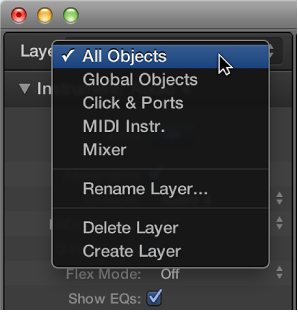

You can create, name, delete, and switch layers in the Environment.
Do one of the following:
Choose Options > Layer > Create Layer.
Choose Create Layer from the Layer pop-up menu.
A new, empty layer called (unnamed) is inserted above the currently selected layer.
Choose Rename Layer from the Layer pop-up menu.
Enter a new name, then click OK.
Do one of the following:
Choose Options > Layer > Delete Layer.
Choose Delete Layer from the Layer pop-up menu.
An alert warns against the accidental deletion of all objects in the layer.
Click Delete to confirm the deletion.
Choose a layer from the Layer pop-up menu.
Choose Options > Go to Previous Layer.