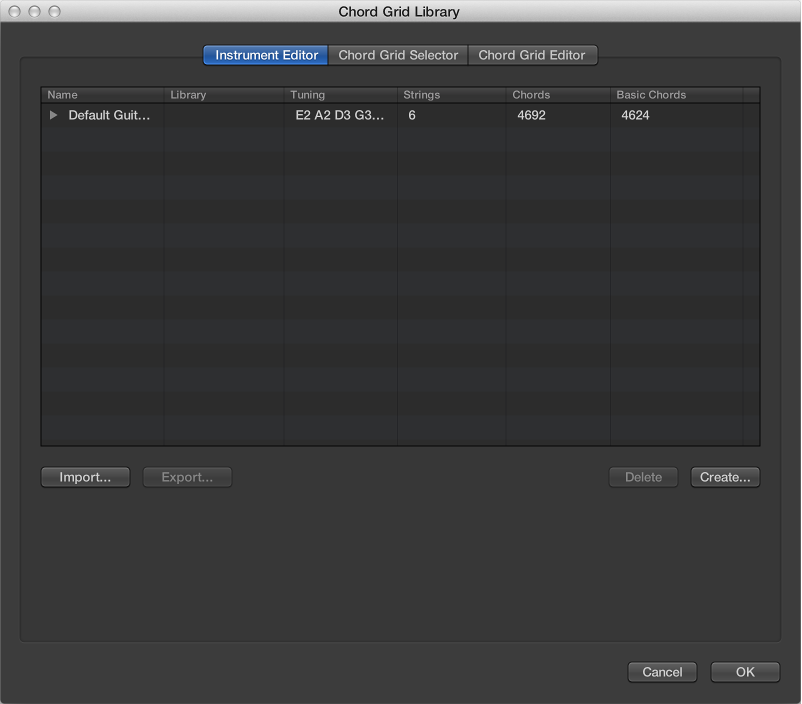

You can create a new chord grid library for an existing instrument tuning, or for a new instrument tuning. You do this from the Instrument Editor pane in the Chord Grid Library.
Open the Instrument Editor pane by doing one of the following:
Choose Logic Pro > Preferences > Chord Grid Library, then click Instrument Editor.
Choose Layout > Chord Grid Library from the Score Editor menu bar, then click the Instrument Editor tab.
Click the Create button.
In the Create Library dialog, define the following parameters:
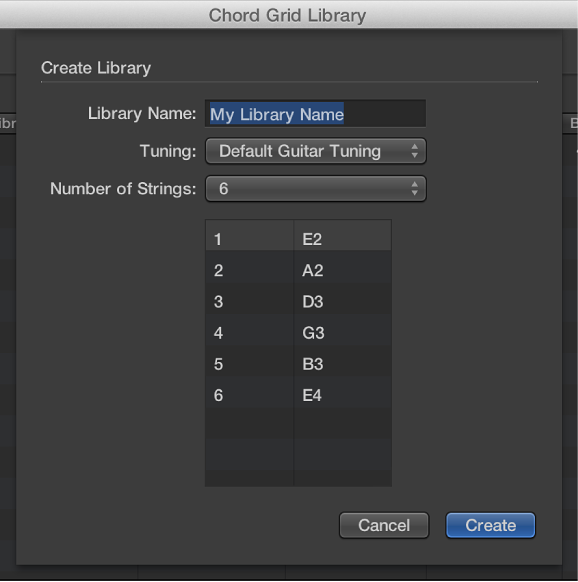
Library Name field: Enter a name for the chord grid library.
Tuning pop-up menu: Choose the instrument tuning in which you want to add the library.
Number of Strings pop-up menu: Leave this at the default setting.
Click Create to add the new chord grid library to the chosen instrument tuning.
Open the Instrument Editor pane by doing one of the following:
Choose Logic Pro > Preferences > Chord Grid Library, then click Instrument Editor.
Choose Layout > Chord Grid Library from the Score Editor, then click Instrument Editor.
Click the Create button.
In the Create Library dialog, define the following parameters:
Library Name field: Enter a name for the chord grid library.
Tuning pop-up menu: Leave this at the default setting.
Number of Strings pop-up menu: Choose the number of strings.
Click Create to add a new instrument tuning, also containing the newly created chord grid library.
Double-click the name in the Library column, then enter a new name.
Select the instrument tuning or chord grid library that you want to delete, then click the Delete button.
If you select an instrument tuning, the entire tuning and its chord grid libraries are deleted. If you select a chord grid library, only that library is deleted (unless it’s the only library within a tuning; then the instrument tuning is also deleted).