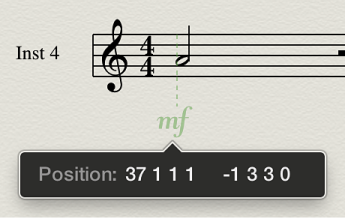

You can show an object’s exact time position by displaying guide lines in the Score Editor. Guide lines show exactly the relation of symbols, staves, and time positions).
Choose View > Guides in the Score Editor menu bar, then choose one of the following display modes:
Off: No guides are displayed.
Dragged Objects: Guides are displayed while objects are dragged.
Selected Objects: Guides are displayed for selected objects only.
Note: Guide lines for selected notes are displayed according to the Selection Color setting in Logic Pro > Preferences > Score.
All Objects: Guides are displayed for all objects.
Note: You can also use the Toggle Guide Lines Display key command, which toggles between All Objects and the last selected display mode.