Add grace notes and independent notes

When Additional Score Options is selected in the Advanced preferences pane, you can add grace notes and other independent notes to a score. Independent notes are notes that aren’t included in the automatic rhythmic (and graphic) display calculation of a measure, but are still played back via MIDI.
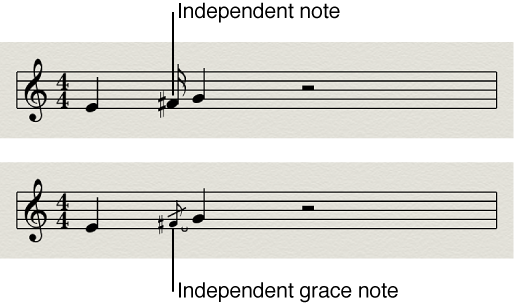
Figure. Independent notes and grace notes in the Score Editor.

Both types of independent notes appear only as single notes, without beams.

Convert notes to independent notes

Convert notes to grace notes

Insert an independent note directly

Grace notes cannot be inserted directly. They need to be created by converting regular or independent notes.

Important:  In most situations, you will need to create additional space between the grace note and the note it’s associated with. The best way to do this is with the Layout tool, which can be used to move the main note away from the grace note. For information, see Position items graphically in the Score Editor.

Tip:  If you want to create beamed grace notes, try using a polyphonic staff style with no rests displayed for the second voice. Assign the grace notes to the second voice, and resize them with the Resize tool. See Add and delete staffs or voices for more information on staff styles.