
You can bounce projects to MP3 (MPEG-2, Audio Layer 3) format files. The MP3 format was developed by the Fraunhofer Institute, and allows high compression rates while maintaining reasonable audio quality. MP3 is a widely used standard for audio file exchange over the Internet.
Because the MP3 file format involves a loss of audio quality, you shouldn’t use MP3 files during production if you have access to the same audio data in non-lossy formats such as AIFF or WAV.
Bounced PCM files are also used for encoding to MP3/M4A. Note that this occurs before dithering takes place.
Note: The MP3 format doesn’t support sampling rates higher than 48 kHz. If the selected sample rate is higher than 48 kHz, a temporary copy of the PCM file (with a 48 kHz sample rate) is created before the project is bounced to MP3 format.
If PCM is unselected in the Destination area of the Bounce dialog, a temporary PCM file is created and used as a source for bouncing to MP3 or M4A, or for burning to a CD (depending on which options are selected).
Selecting the MP3 option in the Destination area automatically disables the PCM > Surround option. This is because the MP3 format doesn’t support surround. However, Split Stereo format is possible, even if the encoded MP3 file is set to Joint Stereo mode.
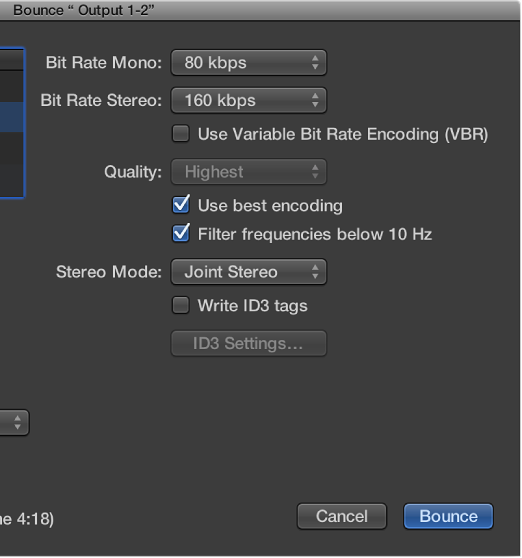
When you click MP3 in the Destination area, the following options are available:
Bit Rate (Mono/Stereo) pop-up menus: MP3 bit rates are available between 32 kbps and 320 kbps, but default to 80 kbps mono, and 160 kbps stereo. These rates offer acceptable quality and good file compression.
For enhanced audio quality, you can choose:
96 kbps for mono streams
192 kbps for stereo streams
You can choose higher rates, but the quality improvement afforded by bit rates above 96/192 kbps is nominal. Note that the higher the bit rate, the larger the file size of the bounce file will be.
Use Variable Bit Rate Encoding (VBR) checkbox: Variable Bit Rate encoding compresses simpler passages more heavily than passages that are (more) harmonically rich, generally resulting in better quality MP3 files.
Because not all media players can accurately decode VBR-encoded files, this option is off by default. If you know that your target listeners can decode VBR-encoded files, you can turn this option on.
Quality pop-up menu: Keep this set to Highest (the default) whenever possible. Reducing the quality shortens the conversion process, but at the expense of audio quality.
“Use best encoding” checkbox: Like the Quality parameter, if you deselect this option, you shorten the time needed to bounce the file at the price of audio quality. This should always be selected, unless conversion time is an issue.
“Filter frequencies below 10 Hz” checkbox: When this option is selected, frequencies below 10 Hz (which usually aren’t reproduced by speakers, and aren’t audible to human ears at any rate) are removed. This leaves slightly more data bandwidth for the frequencies that are audible, resulting in an improvement of the perceived quality. Only deselect this option if you’re experimenting with subsonic test tones.
Stereo Mode pop-up menu: Choose Joint Stereo or Normal stereo mode. Depending on the original file, these settings may (or may not) offer any audible difference. Experiment with both settings to see which provides better results.
“Write ID3 tags” checkbox: Writes ID3 tags to the file.
ID3 Settings button: Opens a dialog where you can edit and configure ID3 tags.
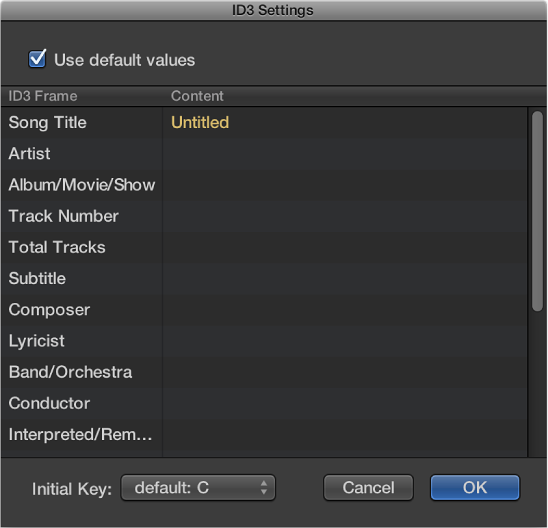
To edit an ID3 tag, double-click any of the Content column fields to the right of the corresponding ID3 Frame column entry, and enter your text.
Select the “Use default values” checkbox to display default settings for certain Content columns, such as the Project Title and Tempo (Beats Per Minute) columns. Selecting “Use default values” also sets the Initial Key column to the first entry shown in the Signature track. (This defaults to C if no key has been set for the project).