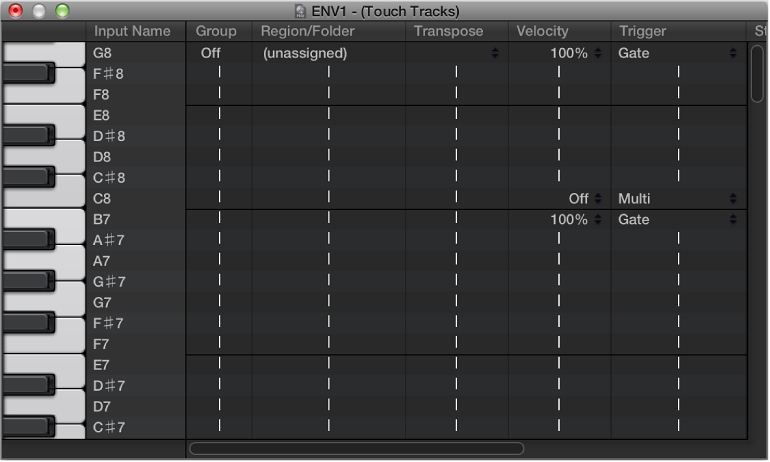

Double-clicking a touch tracks object opens the Touch Tracks window.
This window is similar to the Mapped Instrument window. The input note is selected via the keyboard on the left, and the output region assignment and parameters are set in the columns of the corresponding row. For details about mapped instruments, see Mapped instrument objects overview.
A vertical gray line means that the setting is the same as the line above. If you change a vertical gray line that is above another vertical gray line, the lower one changes to display its previous value. (It’s no longer the same as the line above.)
Region Note Assignment: Dragging a MIDI region or folder into the Environment automatically creates a touch tracks object. All notes (initially) trigger this region. Middle C plays the region or folder at its original pitch, and all other notes transpose it, relative to middle C.
In the Input Name column, you can see the input notes, and to the right, in the Region/Folder column, the names of the assigned regions or folders. On the vertical keyboard to the left, you can select individual notes or pitch ranges by dragging across several keys. If you then drag a MIDI region or folder from the main window, it will only be assigned to the selected note (or note range).
Group: Groups behave as they do in the Step Editor. When you trigger a region, any other (currently playing) region in the same group stops. The Off setting means that the region is not assigned to any group.
Transpos (Transposition): When you drag a region to a key in the Touch Tracks window, that key triggers the region at its original pitch (without transposition). If you want to transpose the region, you can set the amount in the Transposition column.
If a key range is selected when you drag the region into the Touch Tracks window, incremental transpositions are set automatically for adjacent keys (within the key range).
When you create a touch tracks object by dragging a region into the Environment, C3 triggers the region at its normal pitch, and all other keys trigger it (transposed relative to C3).
Velocity: In the Velocity column, you can set the sensitivity of regions to the velocity value of the trigger note: by 100% (very sensitive), 50% (somewhat sensitive), or off (not velocity sensitive).
Trigger Modes: The Trigger column determines how region playback is handled:
Multi: Playing the trigger note starts the region. Playing it again restarts the region, without stopping playback of the originally triggered version.
Single: Playing the trigger note once starts the region. Playing it again stops playback, and restarts the region.
Gate: The region plays until the trigger note is released (or until the region ends).
Gate Loop: The region loops until the trigger note is released.
Toggle: Playing the trigger note starts the region. Playing it again stops playback.
Toggle Loop: Playing the trigger note starts region looping. Playing it again stops playback.
Start: This column allows you to quantize region start and stop. Free means no quantization. The Next 1/16, Next 1/4, or Next 1/1 settings start or stop the region at the next 1/16 or 1/4 note, or at the beginning of the next bar, when a trigger note is played.
Delay: Use this column to assign a delay to the region start point. The delay is set on the right side of the column in ticks, or on the left side in note values. You can use both Delay and Start to make regions start at any position in the measure. For example: Set Start to 1/1 and Delay to 480 ticks to start playback at the second 8th note in the measure.