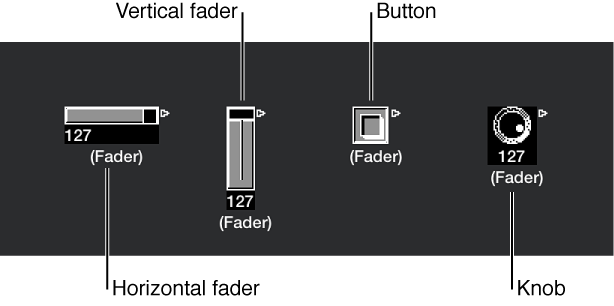

Faders come in different forms (knobs, sliders, numerical, and buttons). You use faders to send MIDI events by clicking or dragging them. Fader objects respond to incoming MIDI events.
Choose New > Fader.
A submenu appears, in which you select a style of fader. There’s also a submenu at the bottom named Special, which you use to select various special fader types (cable switcher, meta-fader, and so on).
The style of a fader determines its onscreen appearance—fader, button, or knob, for example—and how it responds to the mouse (drag, click, or double-click and enter a number).
The auto style fader—the default style if you create a fader with a key command—changes styles as you alter its shape and size.
The type of fader determines what events the fader sends out and responds to. In two cases, however, the fader doesn’t send out events at all:
The cable switcher routes events to its different outputs. Clicking a cable switcher object makes it step sequentially through the outputs.
The alias assigner changes the references (to an original, or parent object) of fader aliases.
In general, a fader’s style is completely independent of its type. A cable switcher can look like a button, a knob can send out MIDI or meta or SysEx events, and so on. The one exception is the vector style fader—these behave in a special way, by sending out two (or four, in special cases) messages at a time, depending on the mouse location within their 2-dimensional, vector window.