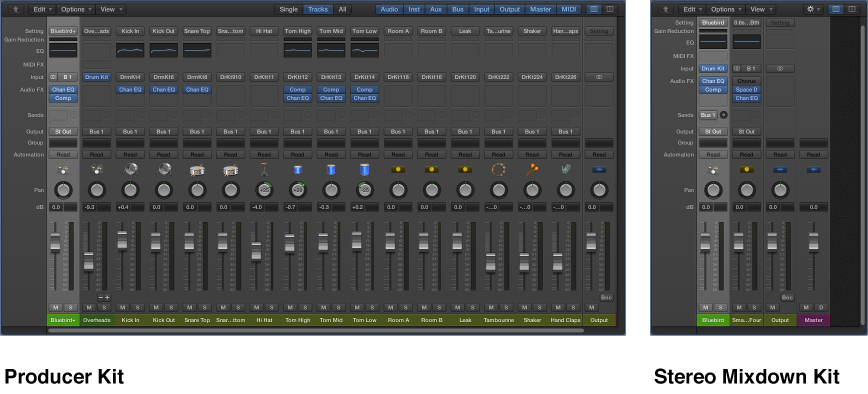
When you add a Drummer track to your project, a drummer and a default patch associated with that drummer are loaded. The default patch is based on a stereo mixdown of the full, multi-miked drum kit mix. These patches are optimized for performance. The original producer patch (Producer Kit) offers full access to all mix options.
Important: When using Producer Kits, make sure that plug-in latency compensation is set to All in General Audio preferences. This ensures phase-coherent playback of all channel strips in the multi-miked drum kit mix.
For live playing, it’s recommended that you use the stereo mixdown patches or the Unmixed+ producer patch in the Library. While some of the patches can contain latency-inducing plug-ins, you can compensate for this by turning on Low Latency mode. To do so, click the Low Latency Mode button in the control bar or select the Low Latency Mode checkbox in General Audio preferences.
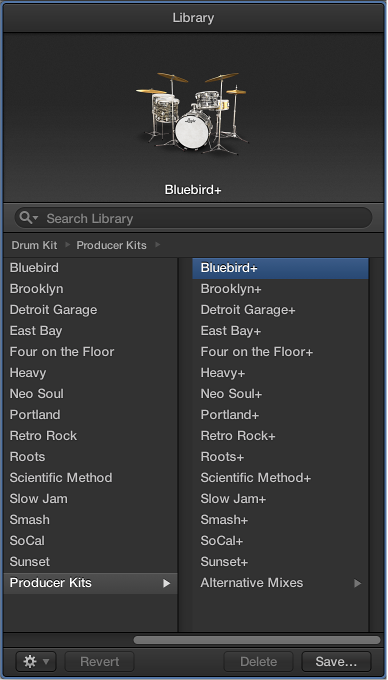
Click the Library button in the control bar, then select the Producer Kits patch category.
Producer Kits are identified in the Library by a “+” at the end of the patch name. There is an original producer patch for each stereo mixdown patch.
Choosing a Producer Kit gives you full access to all 15 individual drum mic channel strips and any effect plug-ins and routings. You also have access to additional mic and room sound settings, and additional drum replacement pieces, in Drum Kit Designer.

 in the control bar, then select the Producer Kits patch category.