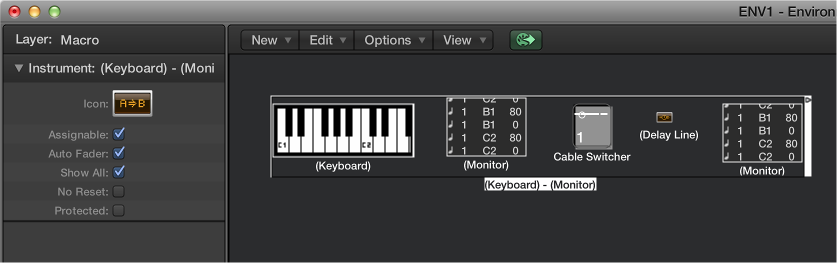

Macros are not actually Environment objects. Rather, they are collections of other Environment objects and their cabling. Macros have a lot in common with standard Environment objects; you can connect cables to and from them, they can be resized, they have their own parameters and icons, they can be chosen as destinations in the track list, and they can be copied or dragged between Environment layers and between projects.
Macros are limited in size. The limit depends on the memory usage of the individual objects within the macro—typically between 100 and 200 objects.
You can nest macros, which means that a macro can contain other macros as objects.
Macros have the following parameters:
Auto Fader checkbox: If you select a group of faders and create a macro from them, selecting this box makes them behave as if they were cabled serially.
Show All checkbox: Determines which objects remain visible when integrated into a macro. When selected, all objects are visible (assuming the macro is not resized to hide some of them). When unselected, only fader, monitors, ornament, and keyboard objects are visible. You can select or unselect this checkbox at any time.
No Reset checkbox: When selected, the macro is prevented from responding to reset messages (set in Logic Pro > Preferences > MIDI > Reset Messages).
Protected checkbox: Select to protect a macro. Protected macros cannot be unpacked, so make sure you’ve made a copy of the objects and cabling before creating a protected macro.
Select all Environment objects that you want to include, then choose New > Macro.
Logic Pro encloses all selected objects in a frame with a gray background.
If some of the objects selected when a macro is being created have cables leading to unselected objects, these cables are deleted when the macro is created. A warning notifies you of this behavior. In this situation, the macro is made from a copy of the original selection of objects, and the original collection of objects remains unchanged.
Double-click any empty (blank) section of the macro object.
The macro reverts back to its component objects and cables.