
Set the playhead position in the LCD
Do one of the following:
Click-hold any of the numbers in the Position display and drag vertically.
Double-click either display field, and then enter a new position.
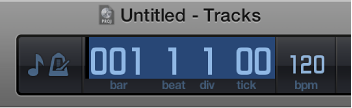
The LCD can display the playhead position in Beats or Time format, or both, depending on which display mode you choose. Beats displays the playhead position in bars, beats, beat divisions, and ticks, while Time displays the playhead position in hours, minutes, seconds, and fractions of a second.
You can edit the individual divisions of the Position display by dragging, or edit the position as a whole by double-clicking and typing.