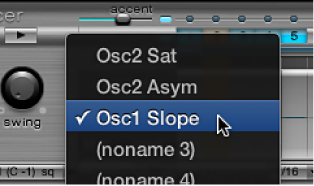
The offset row lets you view and enter offset values on a per-step basis for all Synthesizer section parameters that can be automated. Adjustments made in the offset row are relative to the current parameter value. Values shown in the offset row are either added to or subtracted from the parameter value set in the Synthesizer section. In other words, parameter offsets increase or decrease, but do not specify, an absolute value for the parameter.
Parameter edits can be made in three ways:
By editing offset values in the offset row.
With the shortcut menu.
By directly adjusting the controls in the Synthesizer section. All parameters that you automate (create an offset for) are shown in the Parameter Offset pop-up menu.
Important: Moving a control element in the Synthesizer section adds the parameter to the Parameter Offset pop-up menu and creates an offset, so take care.
Create a parameter offset
Select the drum sound that you want to offset.
Click a position in the (parameter) offset row that corresponds to the step you want to edit.
Make the parameter change in the Synthesizer section. Your change is recorded as an offset value for this step.
Repeat step 3 for each parameter that you want to edit for this step.
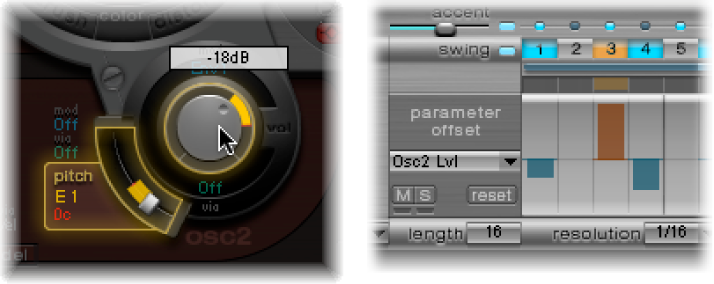
A parameter offset that has been created for a given parameter on a given step is represented in two ways.
A yellow bar is drawn on the parameter that indicates the deviance (the offset) between the original parameter value and the new parameter value.
In the (parameter) offset row, the offset from the original parameter is represented as a bar starting from the zero point (horizontal center line).
Positive offsets are shown as a bar above the center line.
Negative offsets are shown as a bar below the center line.
Use the Ultrabeat parameter offset shortcut menu
Control-click (or right-click) any step in the (parameter) offset row to open a shortcut menu, then choose one of the following commands.
Alter: Changes the (selected) parameter values, for all steps, by a random amount.
Randomize: Creates a new, random value for the selected parameter.
Note: Consider saving your sequence/pattern before using either of the above commands.
Delete: Deletes all steps for the currently selected parameter.
Mute, solo, and reset Ultrabeat parameter offsets
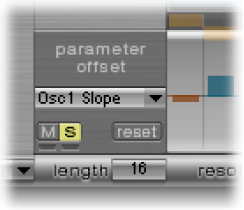
Click the M(ute), S(olo), and Reset buttons in the parameter offset row.
M(ute): Mutes the offsets of the selected parameter. This does not remove or reset existing offsets.
S(olo): Enables you to hear the effect of your offsets on the selected parameter only.
Reset: All offset values for the selected parameter are set to zero (no offset). A second click on the Reset button removes the parameter from the Parameter Offset menu.
Note: The Reset button at the left of the velocity/gate row changes to Delete when clicked once. This Delete button mirrors the behavior of the Delete command: It deletes all steps for the currently selected parameter.