The basic bass is played with the fingers. In this example, you will simulate playing the strings with a pick, using the Pick object type. The Timbre parameter is used to adjust the relationship between the speed and intensity at which the string is struck. The Variation parameter is used to define the virtual material density, or hardness, of the pick.
If you imagine the fingers to be very soft picks, it makes sense to alter the Pick parameters so that a hard plastic pick is the outcome.
Load the E-Bass Fingered Basic setting.
Set the Timbre parameter of Object 1 to its maximum value of 1.00.
The attack is now stronger.
Try several different Variation settings to get a feel for the material qualities of the pick.
Note: Not all positions deliver usable results for the entire range of the instrument.
You’ll get a consistent, working setting for the two octaves above E 0 with the following parameter settings: Position 0.17 (Pickup display), Strength 1.00 (maximum), Timbre 0.90, and Variation 0.56.
When these settings are used, you’ll find that the sound has become softer and very thin. In fact, it’s somewhat reminiscent of a clavinet.
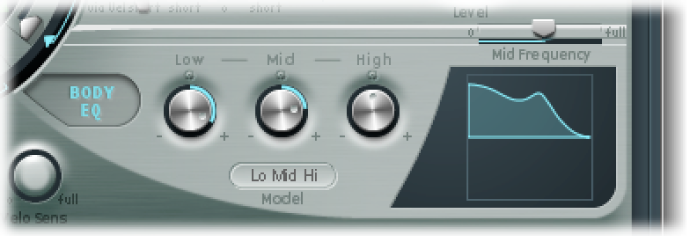
Activate the Body EQ and add a healthy portion of bottom end to the sound by setting the Low parameter to 0.60. Mid should be set to 0.33.
Set the High knob to −0.45 because the sound is now so bright that rolling off a few of the highs can’t hurt.
Bring the volume into line. If you adjust the Level knob to 2.5 dB, nothing should be distorting. If this isn’t the case, try reducing some more of the bottom end with the Low knob.
Save this setting as Pick Open Roundwound.
Playing with a pick is often combined with a damping technique that employs the ball of the thumb. The right hand, which also holds the pick, should physically lie on top of the strings at the bridge. This technique results in the sound having less overtone content but becoming more percussive and punchy at the same time. You can variably control the timbre of the sound through the angle and pressure of your hand while playing.
Object 3 is used to emulate the virtual ball of the thumb in this example. The Timbre parameter determines the kind of damping that occurs, and Variation dictates the length of the string section that is being dampened.
Set the Object 3 type to Damp.
Set Object 3 Strength to 0.50.
Move Object 3 a little to the right in the Pickup display (to position 0.95) to simulate the width and position of the ball of the thumb lying on the bridge.
Set Timbre to its minimum value (−1.00) to achieve a very soft damping effect.
Set the Variation parameter to its maximum value of 1.00.
A metallic ringing occurs during the attack phase and still can be heard in the octave above E0.
To suppress the ringing, move the small green diamond on the Material Pad to a position directly under the ball. In doing so, you’ve just increased the Inner Loss value for the low key range.
Note: To place the diamond exactly under the ball, you can click it while pressing the Option key.
Save this setting as Pick Bass Half Muted.
Harmonics are single partials (overtones) of the overall sound. They can be heard by damping certain points along the string. This is done by lightly laying the fingers of the left hand (assuming a right-handed bass player) on the string—not pressing down—before the note is articulated. The first overtone, the octave, is achieved by placing your finger at the exact middle of the string—in effect separating the string into two halves. The next overtone is the fifth above the octave, and the position of your finger should divide the string into a ratio of one-third to two-thirds. The next overtone separates the string into proportions of one-quarter to three-quarters, and so on.
Object 3 is used as a damper. Choose the Damp type.
Adjust Object 3 Timbre to a value of 1.00.
Adjust Variation to its initial value of 0.00 by clicking the Variation slider while holding down the Option key.
Move Object 3 to the exact middle (0.50) of the Pickup display. Play the keyboard, and you’ll hear the first overtone as a harmonic.
While playing, very slowly move Object 3 toward the left of the Pickup display. In doing this, you are effectively scrolling through the overtone series, so to speak.
Save this setting as Flageolet Xmple.
Load the Pick Bass Half Muted setting.
Drag the Material Pad ball upward and the sound becomes more muffled.
Increase the Object 3 Strength parameter to 0.70. The result is a muted pick bass with flat wound strings.
Tip: If you turn off Object 3, you’ll hear a sound that is reminiscent of a 1970s Fender Precision Bass.
Save this setting as Flatwound Pick Damped.
Turn Object 3 back on.
Move both pickups a little to the left (position 0.08).
Move the virtual pick (Object 1) a little farther to the outside (position 0.10).
Enhance the sound with the Body EQ by turning the Low knob to its maximum value (1.00).

To remove the smacking in the attack phase, use the graphical display to choose a value of 0.48 for the Body EQ Mid frequency, then use the knob to increase this value to 0.51. Option-click the Body EQ High parameter to set it to a value of 0.00.
Save this setting as Easy Listening Pick Bass.