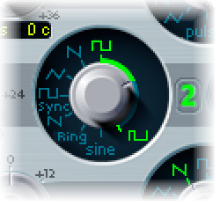

You can alter the tonal color of rectangular waveforms by scaling the width of waveform pulses to any value. This is known as pulse width modulation.
ES2 pulse width modulation features are extensive. For example, if rectangular waves are chosen for all oscillators, you can simultaneously modulate the pulse width of oscillator 1 and the synchronized pulse waves of oscillator 2 (or the square wave of the oscillator 2 ring modulator) and oscillator 3.
Drag the waveform rotary control that surrounds the Wave knob (see the highlighted area in the image above).
Only oscillators 2 and 3 allow you to define a base (default) pulse width, prior to any pulse width modulation.
Choose a rectangle wave for oscillator 1.
In the router, choose Osc1Wave as the target, and LFO1 as the source.
Adjust the modulation amount slider (try a value of 0.12).
Choose a sine wave for LFO 1.
Adjust the LFO 1 Rate (around 0.160 Hz for a slow sweep).