
Drum Machine Designer lets you interact with electronic drum kits and drum kit pieces.
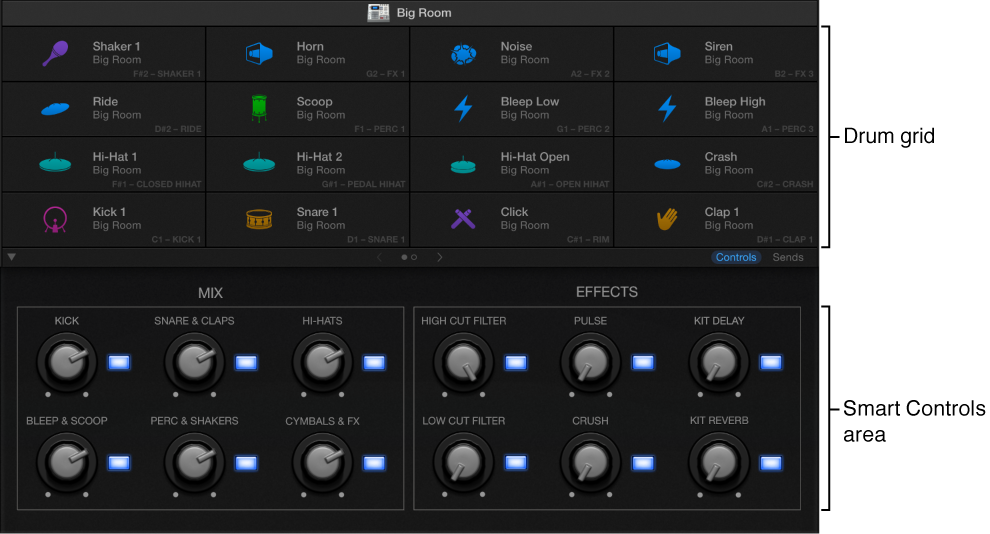
The Drum Machine Designer interface is divided into the following main areas.
Drum grid: Click a drum cell to play its sound. Each cell offers its own kit piece or sound. You can mute, solo, reorder, replace, and change the sound of each kit piece. See Use Drum Machine Designer.
Smart Controls area: Smart Controls parameters update according to the currently selected drum kit or drum kit piece. You can edit parameter values for the entire kit or individual kit pieces. See Use Drum Machine Designer.
Note: The parameters shown at the bottom of the window mirror the Smart Controls pane when the track or channel strip with the Drum Machine Designer patch is selected.
Do one of the following:
In the Drummer Editor: Click the plug-in button (shows the default patch associated with the drummer) at the bottom of the drummer card.
In the inspector or Mixer: Click Drum Machine Designer in the respective Drummer track channel strip slot.
In a software instrument channel strip: Click the instrument slot, then choose Drum Machine Designer from the menu.