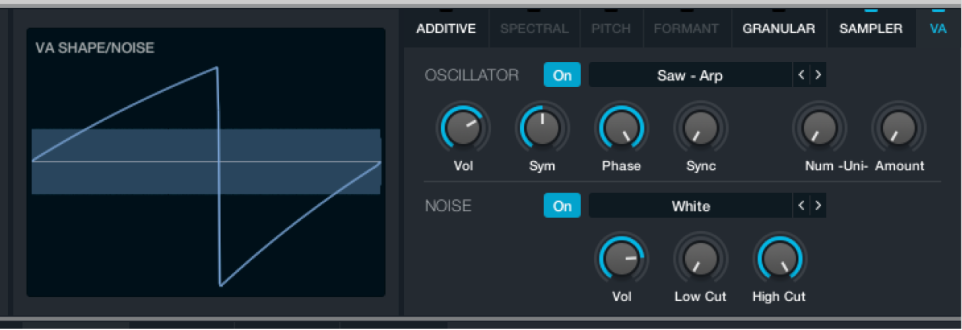

Source components are shown only in advanced view. Click the Advanced button to switch to advanced view, then click the A/B/C/D button to select the source you want to edit.
The parameters in this section are shown when the VA button is active in a source subpage.
Virtual Analog parameters
Oscillator on/off button: Turn on to use the main oscillator. When you click the Name bar File button, then choose Clear from the pop-up menu to initialize Alchemy to default settings, the VA element is automatically enabled.
Wave pop-up menu and field: Choose an oscillator waveform. The Basic category offers Saw, Sine, Square, and Triangle waves. A large variety of more specialized waves is also provided. You can also step through the available waveforms with the Previous and Next buttons (the arrows).
(Oscillator) Vol knob: Set the output level of the oscillator. When multiple elements are used in a source, use this control to set the relative level of the oscillator component.
Sym knob: Alter the symmetry, or shape, of the oscillator waveform. When a square wave is active, Symmetry acts as a pulsewidth control. The effective range is between 5% and 95% because extreme values may cause sonic artifacts.
Phase knob: Set the oscillator start point (phase). Values from 0% to 99.9% set a fixed start point for the oscillator. A value of 100% causes random variations of the waveform start point each time the oscillator is triggered.
Sync knob: Enable oscillator sync and set the pitch that the main oscillator is synchronized with.
Num(ber) knob: Set the number of unison voices.
Amount knob: Set the amount of detuning and stereo width variance between unison voices.
Noise on/off button: Turn on to use the noise oscillator.
Noise pop-up menu and field: Choose a noise waveform. The preset waveforms have different spectral characteristics that can be further refined with the filter knobs. You can step through the available waveforms with the Previous and Next buttons (the arrows).
(Noise) Vol knob: Set the output level of the noise oscillator. When multiple elements are used in a source, use this control to set the relative level of the noise component.
Low Cut knob: Set a low cutoff frequency for the noise oscillator. All frequencies above this value are allowed to pass. All frequencies below this value are attenuated.
High Cut knob: Set a high cutoff frequency for the noise oscillator. All frequencies below this value are allowed to pass. All frequencies above this value are attenuated.
The Low Cut and High Cut parameters work in conjunction with each other to act as a bandpass filter, where the noise signal that falls within the two cutoff ranges is allowed to pass.