
Source components are shown only in advanced view. Click the Advanced button to switch to advanced view, then click the A/B/C/D button to select the source you want to edit.
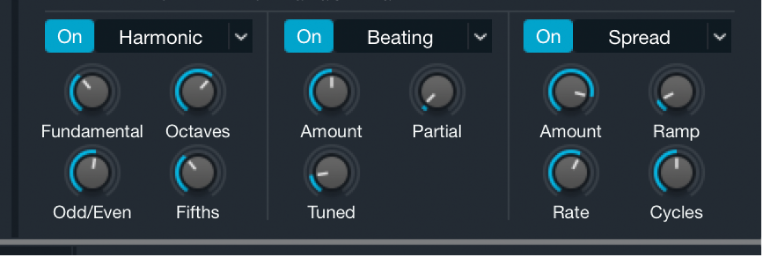
Three effects units are available in the lower half of the additive parameters shown in the source subpage. See Additive element controls. These are not audio effects in the traditional sense; rather they provide ways to control entire groups of partials simultaneously. Each unit provides a different selection of effects. Unit 1 is devoted to amplitude effects, unit 2 to pitch effects, and unit 3 to panning effects.
The initial configuration of the effects units varies with use of a default preset or when you import a sample. A preset with cleared settings loads the Pulse/Saw module into unit 1. A sound with an imported sample loads the Harmonic module into unit 1.
Note: Some effects are included only for compatibility with older Alchemy versions. These effects are shown when a preset based on the older Alchemy architecture is loaded, but you cannot see, nor insert, these “legacy” effects in new presets or in presets designed for the new Alchemy architecture.
Additive effect 1 (amplitude) parameters
Additive effect on/off button: Enable or disable the additive effect unit.
WARNING: Turning off additive effects modules, particularly additive effect 1, can result in a significant level increase. It is best to turn down your amplifier or mixer levels to avoid signal spikes that may damage your speakers or hearing.
Additive effect 1 pop-up menu and field: Adjust the levels of different partial groups. Choose from: None, Pulse/Saw, and Harmonic. You should note that choosing None results in an equal volume level for all partials, which can sound extremely bright and harsh. The chosen effect type determines the controls that are shown.
Pulse/Saw: Scales partial levels to make higher partials softer than low partials. Loaded by default when no sample has been imported into the additive element of the source.
Harmonic: Allows you to set groups of partial levels. Loaded by default when a sample has been imported into the additive element of the source.
Pulse/Saw knob: Set the mix ratio between a pulse wave and a sawtooth wave, created by summing sine wave partials tuned to a harmonic series. Turn toward Pulse to mute even harmonics.
Note: If one of the complex waveforms is used, the Pulse/Saw knob behaves differently.
Fundamental knob: Set the level of the fundamental tone and all partials above it. Set to zero to completely remove the fundamental tone. Set to 100% to hear the fundamental tone in isolation. Higher values tend to make the sound thicker.
Octaves knob: Set the level of the fundamental tone and all partials at whole octave intervals above it. Set to zero to completely remove harmonics 1, 2, 4, 8, 16, and so on, while boosting the levels of non-octave harmonics. Set to higher values to boost the levels of octave harmonics while reducing the levels of other harmonics.
Odd/Even knob: Set the balance between odd or even harmonics. Low values increase the level of odd-numbered partials 1, 3, 5, 7, and so on, making the sound more hollow. High values increase the level of even harmonics (retaining the fundamental tone: harmonic/partial 1) to make the sound brighter and sweeter.
Fifths knob: Set the level of the fundamental tone and all partials at fifth intervals (7 semitones) above it. Higher values boost harmonics 1, 3, 9, 27, and so on, with a corresponding reduction in the levels of other harmonics. Low values have the reverse effect and can make the sound more cutting and edgy.
Additive effect 2 (pitch) parameters
Additive effect on/off button: Enable or disable the additive effect unit.
Additive effect 2 pop-up menu and field: Adjust the tuning of different partial groups. Choose from: None, Beating, Stretch, Shift, and Magnet. The chosen effect type determines the controls that are shown.
Beating: Allows a group of partials to be detuned to create beating effects as they move in and out of phase with adjacent partials or to add a clangorous, atonal character to a sound. The group of partials affected is defined by the Partial knob.
Amount knob: Set the amount of detuning for the selected partials. The range of this knob is determined by the position of the Tuned knob.
Partial knob: Define the pattern of partials affected. Set to 2 to limit the detuning affect to only partials 2, 4, 6, 8, and so on; set to 3 to apply detuning to only partials 3, 6, 9, 12, and so on. Higher values affect fewer partials, which in turn changes the impact of the Amount knob, making it more subtle.
Tuned knob: Set the range for the Amount knob. This knob behaves like a switch.
On: At the zero position, the selected partial is tuned down to the pitch of the second partial below. When the Amount knob is at 100%, the selected partial is unaffected.
Off: At the zero position, the selected partial is tuned down to the pitch of the second partial below. When the Amount knob is at 100%, the selected partial is tuned up to the pitch of the next partial above.
Stretch: Allows the tuning of partials to be stretched upward, sharpening upper partials while retaining the original pitch of the fundamental tone. This stretching of the harmonic series is typical of instruments that use vibrating strings or tines.
Stretch knob: Stretch the tuning of all partials equally. Higher values increase the intervals between partials and shift higher partials upward. Lower values decrease the intervals between partials and shift higher partials downward. This is a quick way to tune upper partials without the need to manually edit partial pitch values in the additive editor. See Additive edit window overview.
String knob: Stretch the tuning of higher partials more intensely than lower partials. Small increases can result in a subtle sweetening of the sound without altering its basic character. Larger increases can add an inharmonic, metallic, or bell-like quality to upper partials. Modulate this parameter with an envelope to add a plucked string type articulation to the start of a note.
Shift: An unusual frequency shifter type effect that moves all partials up or down by the same amount in Hertz, thereby breaking the harmonic relationships between them. In a sound with a fundamental frequency of 220 Hz and a second harmonic an octave higher at 440 Hz, an upward frequency shift of 100 Hz results in partials at 320 Hz and 540 Hz, with the second partial no longer an octave higher than the first. This effect type can radically alter the harmonic structure, leading to inharmonicities and atonalities, in addition to a perceived change of the fundamental pitch.
Pitch knob: Set the amount of shift for the first harmonic. All subsequent partials are shifted by the same amount in Hertz rather than in semitones because this would result in a simple pitch change. Defining the frequency shift in this way retains a consistent timbre as you play up and down the keyboard.
Freq knob: Define a static shift in Hertz. Because the shift does not track the keyboard, the timbre of the resulting sound changes from note to note. When combined with another harmonic sound (in the VA section, for example), small shifts can create beating, chorus-type effects between the source elements.
Magnet: Allows you to shift the tunings of all partials toward a specified target pitch. This can lead to unusual effects and can result in dramatic transformations of the sound.
Amount knob: Specify the amount of pitch shift as a percentage. At 100%, all partials are set to the pitch determined by the Pitch knob. At 50%, all partials are moved halfway to the target pitch. Subtle use of this parameter can turn harmonic pitched sounds into atonal bell-like timbres, for example.
Pitch knob: Set the target pitch. All partials are shifted toward the target when the Amount knob is rotated. At low positions, partial pitches shift down. Toward 100%, partial pitches shift up. At 50%, high partial pitches shift down and low partial pitches shift up. Adjust the knob to balance the shift and to control the brightness of any atonal, inharmonic elements that may be introduced to the sound.
Additive effect 3 (pan) parameters
Additive effect on/off button: Enable or disable the additive effect unit.
Additive effect 3 pop-up menu and field: Adjust the position or width of partials in the stereo field. Choose from: None, Auto Pan, and Spread.
Auto Pan: Modulates the pan positions of all partials from left to right in a regular pattern.
Spread: Modulates the pan positions of all partials to create a wide pseudo-stereo effect. Partials are panned left to right in a regular pattern, with every second partial position inverted.
Amount knob: Set the depth of the stereo panning effect.
Rate knob: Set the speed of the stereo panning effect.
Ramp knob: Set the panning amount for lower partials. This can help to create a subtler widening of the sound, with less obvious left to right movement in the important lowest partials.
Cycles knob: Set phase differences between partials. At zero, all partials are in-phase. Higher values lead to a finer-grained, more subtle and complex effect.