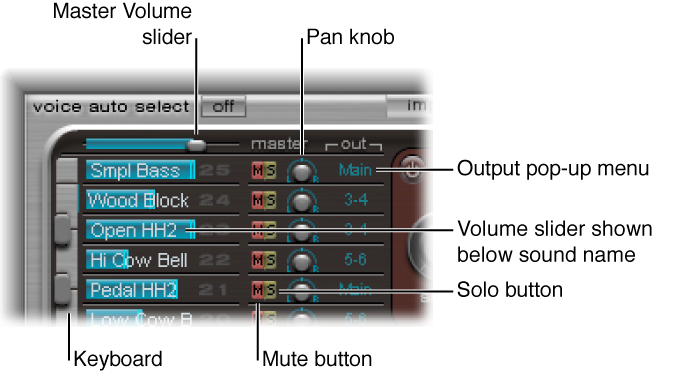

The Assignment section displays all sounds in a drum kit. You can:
Select, organize, and name sounds
Import sounds from other Ultrabeat settings or EXS instruments
Set relative levels and pan positions for each sound
Mute or solo sounds in the drum kit
Assignment section parameters
Master Volume slider: Control the levels of all drum sounds in the drum kit—the overall mix level of all drum sounds.
Volume slider: Drag the blue slider to set the volume for the sound. All drum sound levels are indicated by blue sliders, providing an overview of relative levels within the kit.
Keyboard: Acts as a display when MIDI information is received. Click the keys to play the sound on the corresponding row.
Mute buttons: Silence one or multiple sounds in the drum kit.
Solo buttons: Hear one or multiple drum sounds in isolation. All other drum sounds (unsoloed) are muted.
Pan knobs: Position drum sounds in the stereo field (panorama).
Output pop-up menus: Use to independently route each drum sound to individual outputs, or output pairs. Ultrabeat features eight separate stereo and mono outputs when inserted as a multi-output instrument.
Drum sounds that are routed to an output pair other than Main (1–2) are automatically removed from the main output channel strips.
Choosing an output pair other than Main (1–2) routes the sound to an aux channel strip.