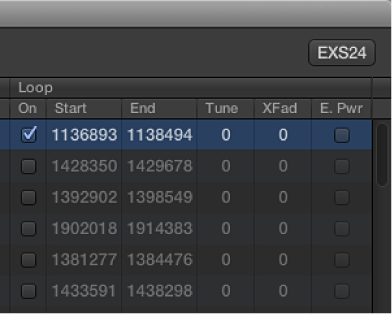

EXS24 mkII can loop playback of either an entire sample or a portion of it, when sustained MIDI notes are received.
Zone loop parameters
Loop On checkbox: Click to enable looping and to allow access to the other Loop parameters.
Loop Start, Loop End fields: Define discrete loop start and end points, allowing you to loop a portion of the audio file.
Control-click either field to open a shortcut menu that allows access to the Logic Pro X Audio File Editor (or an external editor). This enables you to set the loop start and end points graphically: Loop Start is represented by the LS marker and Loop End by the LE marker. See Edit samples in the Logic Pro X Audio File Editor.
Tune field: Changes the tuning of the looped portion of the audio file in cent increments.
Xfade (Crossfade) field: Determines the crossfade time between the end/start of a looped sample. In a crossfaded loop, there is no “step” between the loop end and loop start points. The higher the value, the longer the crossfade and the smoother the transition between the loop end and start points. This is especially convenient with samples that are hard to loop and that would normally produce clicks at the transition point—the join in the loop.
E. Pwr (Equal Power) checkbox: Click to enable an exponential crossfade curve that causes a volume boost of 3 dB in the middle of the crossfade range. This fades out/fades in the join between the loop end and start points at an equal volume level.
Note: The ideal settings for the Xfade and E. Pwr parameters depend on the sample material. A loop that cycles reasonably smoothly is the best starting point for a perfectly crossfaded loop, but a crossfaded loop does not always sound better. Experiment with both parameters to learn how, when, and where they work best.