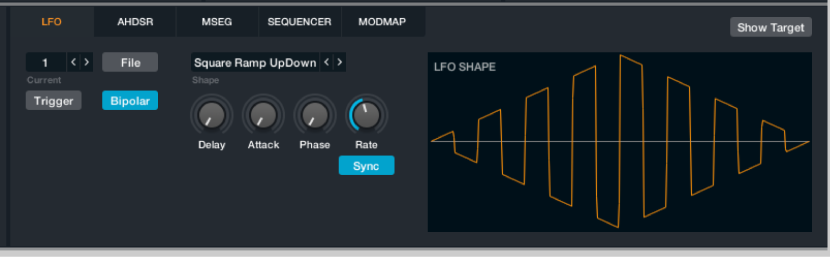

Modulation components are shown only in advanced view. Click the Advanced button to switch to advanced view.
The LFO module provides a standard Low Frequency Oscillator, such as you might find in any conventional synthesizer or sampler. There are one or two unusual features, however.
Note: The LFO module has no depth control. The modulation depth is adjusted using the Depth knob alongside the slot in the modulation rack.
LFO controls
Current LFO pop-up menu and field: Access each LFO control panel by selecting a number from the pop-up menu or with the Previous and Next arrows. Alchemy provides up to 16 LFOs—one by default, but more if you create them when assigning modulators.
File button: Open a pop-up menu with a number of LFO-related commands.
Preset submenu: Choose a preset LFO shape. This can be used as is or as a starting point for your own shapes.
Save: Save the current LFO settings. A dialog opens where you can name and save the file (*.lfo). The new LFO name appears at the bottom of the Preset submenu.
Copy/Paste: Use these commands to copy parameter settings between LFOs.
Clear: Initialize the LFO.
Trigger button: Turn on to retrigger the LFO (start again from zero) with each new played note. When Trigger is deactivated, the LFO runs freely. Also see the Delay, Attack, and Phase knob descriptions.
Bipolar button: When active, the LFO outputs both negative and positive values in each cycle (from -50% to 50%). When off, only positive values are output (from 0% to 100%).
Shape pop-up menu and field: Choose an LFO waveform from several categories. You can also step through the available waveforms with the Previous and Next buttons (the arrows). A waveform graphic shows the chosen LFO shape.
Basic: Common waveforms such as RampUp, RampDown, Sine, Square, and Triangle, along with two random choices. RandGlide is a constantly fluctuating random modulator that moves smoothly between random values at a speed set with the Rate control. RandHold is a stepped random modulator that jumps between random values at a speed set with the Rate control, holding each value until the next jump occurs.
Complex: A variety of complex cycles, sweeps, and patterns can be used to create regular (and irregular) patterns for your LFO modulations.
Random Patterns: A variety of complex patterns that can be used to create random LFO modulations.
Serial-Angular: A variety of stepped shapes.
Serial-Smooth: Provides complex rising-and-falling patterns.
Ultra High Frequency: The ultra-high frequency category waveform shapes contain multiple copies of a pattern. The modulation speed is a multiple of the speed set with the Rate control.
Delay knob: Introduce a delay between the note-on message and the first cycle of the LFO when Trigger (see above) is on. The delay is adjustable over a range of 0.00 seconds to 20.00 seconds. When Trigger is off, Delay has no effect.
Attack knob: Fade in the LFO output to increase modulation depth the longer a note is held (when Trigger is on). The attack time is adjustable over a range of 0.00 seconds to 20.00 seconds. When Trigger is off, Attack has no effect.
Phase knob: Adjust the start point of the LFO from zero to later in the cycle (when Trigger is on). The available range is 0.00% to 100.00%.
Rate knob: Set the LFO rate or frequency. When the Sync button is off, the rate is adjustable over a range of 0 Hz to 220 Hz. When Sync is turned on, the Rate control is set in beats and fractions of a beat.
Sync button: Turn on to synchronize the LFO with the Logic Pro X tempo. Turn off to set the LFO speed freely with the Rate knob.