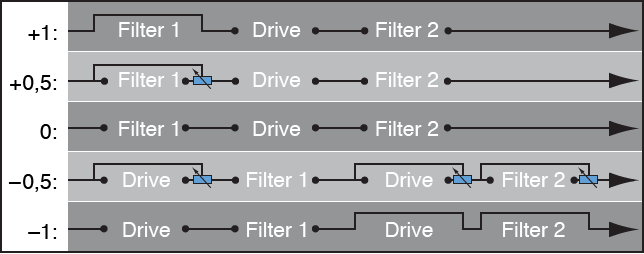
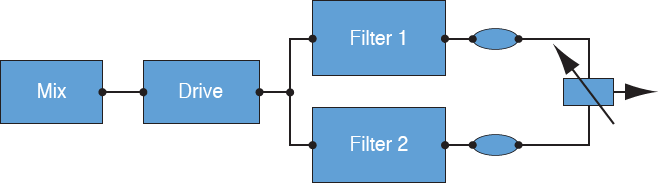
Filter Blend can have a significant effect on the ES2 signal flow. Regardless of whether parallel or series filter configurations are chosen, a Filter Blend setting of −1 results in only Filter 1 being audible. A Filter Blend setting of +1 limits audibility to Filter 2. The figures illustrate the signal flow between the Oscillator Mix stage (the Triangle) and the dynamic stage (the Amplifier). The signal flow through the filters and the filter overdrive circuit (the Drive parameter) are dependent on the Filter Blend setting.
Filter Blend: Series filter configuration information
Use positive values for Filter Blend to partially bypass Filter 1.
Use negative values for Filter Blend to partially bypass Filter 2.
When zero or positive Filter Blend values are used, there is only one overdrive circuit for both filters.
Use of negative Filter Blend values introduces another overdrive circuit, which distorts the output signal of the oscillator mix stage before it is fed into the first filter.
If Drive is set to 0, no distortion occurs.
Filter Blend: Parallel filter configuration information
In a parallel configuration, the overdrive/distortion circuit—the Drive parameter—is always wired after the oscillator mix stage—the Triangle—and before the filters. The filters receive a mono input signal from the output of the overdrive circuit. The outputs of both filters are mixed to mono via Filter Blend.
The Filter Blend parameter is available as a modulation target in the router. You can use manual control sources, such as the modulation wheel, to change the filter blend; but the Filter Blend target can also be used creatively, to rapidly switch or smoothly fade between the two filters. You can also use velocity, or a combination of the Vector Envelope and Planar Pad as sources. The latter allows for interesting filter control possibilities that evolve independently, or alongside oscillator parameters that are also being controlled with the Vector Envelope.
Crossfade between filters
Drag the Filter Blend slider to crossfade between the two filters when cabled in parallel.
If Filter Blend is set to the top position, you only hear the effect of Filter 1.
If Filter Blend is set to its lowest position, you only hear the effect of Filter 2.
In between these positions, the filters are crossfaded. You hear the effect of both filters.
You can also crossfade the filters when they are cabled in series. In this situation, the distortion—controlled by the Drive parameter—also needs to be considered, as this can be positioned either before or in between the filters, depending on the Filter Blend setting you choose.
Modulate Filter Blend with an LFO
Set up a modulation routing as follows: modulation target FltBlend, source LFO2.