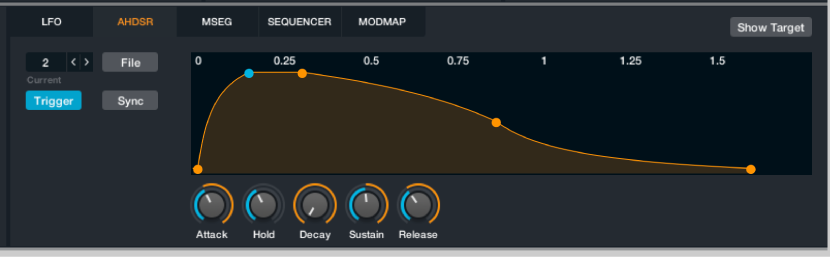

Modulation components are shown only in advanced view. Click the Advanced button to switch to advanced view.
The AHDSR module provides an envelope generator with Attack, Hold, Decay, Sustain, and Release stages. The A, H, D, and R times can be set independently. You can set the level of the S stage which is maintained until a MIDI note off message is received.
The AHDSR display shows a graph of envelope generator output. The ruler along the top shows the time, calibrated in seconds or in beats when Sync is activated. The envelope appears as series of points joined by lines or curves representing the different envelope segments.
You can set AHDSR values with the controls outlined in this section or by dragging points on the envelope graphic.
You can adjust the curvature of segments between points. Drag the line between points upward to make a segment progressively more convex; drag it downward to make a segment progressively more concave. Convex, linear, and concave envelope segments produce characteristically different effects. Option-click the line to reset a segment to a linear slope.
Envelope controls
Current AHDSR pop-up menu and field: Access each AHDSR control panel by selecting a number from the pop-up menu or with the Previous and Next arrows. Alchemy provides up to 16 envelopes—one by default, but more if you create them when assigning modulators.
File button: Open a pop-up menu with a number of envelope handling commands.
Preset submenu: Choose a preset envelope shape. This can be used as is or as a starting point for your own envelope shapes.
Save: Save the current envelope. A dialog opens where you can name and save the envelope file (*.ahd). The new envelope name appears at the bottom of the Preset submenu.
Copy/Paste: Use these commands to copy settings between envelopes.
Clear: Initialize the AHDSR.
Randomize: Create a random envelope shape. This can be used as is or as a starting point for your own envelope shapes.
Trigger button: Turn on to retrigger the envelope (start again from zero) with each new played note. When Trigger is off, the envelope triggers for the first note only and continues its progress for subsequent notes: the envelope retriggers only for notes received after all other notes have completed the release phase.
Sync button: Turn on to synchronize the envelope with the Logic Pro X tempo. When you adjust the AHDR knobs, the envelope snaps to bars and beats. Turn off to set envelope stage times freely.
Attack knob: Set the time required to reach the peak amplitude level after a note is played. Adjustable from 0.00 seconds to 20.00 seconds.
Hold knob: Determine the time that the peak amplitude level is held before the decay stage of the envelope begins. Adjustable from 0.00 seconds to 20.00 seconds.
Decay knob: Set the time required for the peak amplitude to fall to the sustain level. Adjustable from 0.00 seconds to 20.00 seconds.
Sustain knob: Set the envelope sustain level as a percentage of peak amplitude. Adjustable from 0% to 100%.
Release knob: Set the time required for the signal amplitude to fall from the sustain level to zero, after the key has been released. Adjustable from 0.00 seconds to 20.00 seconds.
Tip: Where possible, try to use the minimum required envelope release times in order to reduce voice overlap because this helps to reduce CPU load.