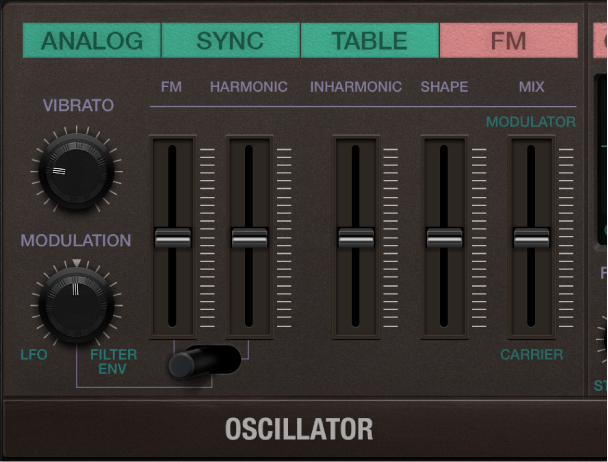

The synthesizer oscillators are used to generate the basic tonal color. This signal is then sent to other parts of the synthesizer engine for shaping, processing, or manipulation. See Retro Synth filter controls, Retro Synth amp and effect controls, Use Retro Synth modulation, and Retro Synth global and controller settings.
In FM synthesis, the basic sound is generated by setting different tuning ratios between the modulator and carrier oscillators and by altering the FM intensity. The tuning ratio determines the basic overtone structure, and the FM control sets the level of these overtones.
At the core of the Retro Synth FM synthesis engine, you’ll find a multiwave modulator oscillator—the (Wave) Shape slider, and a sine wave carrier oscillator—the FM (Amount) slider. The basic sine wave of the carrier oscillator is a pure, characterless tone.
To make things more sonically interesting, the modulator oscillator is used to modulate the frequency of the carrier oscillator. This modulation occurs in the audio range (you can actually hear it), and results in a number of new harmonics becoming audible, thus changing the tonal color.
The pure sine wave (of the carrier oscillator) is combined with the newly generated harmonics, making the sound much more interesting.
You can make fine changes to the tuning ratio of the two oscillators (and therefore the levels of the harmonics) by adjusting the Harmonic and Inharmonic controls.
FM oscillator parameters
Vibrato knob: Rotate to set the amount of vibrato (pitch modulation).
Modulation knob: Choose an FM amount modulation source, and set the modulation intensity.
FM (Amount) slider: The carrier waveform is a simple sine wave. Drag to adjust the level of this basic tone.
FM/Harmonic switch: Control the harmonic/inharmonic content of your sound with the LFO or Filter Envelope.
The left switch position lets you use the LFO or Filter envelope to modulate the FM (Amount).
The middle switch position lets you use the LFO or Filter envelope to modulate the FM (Amount) and Harmonic content at the same time.
The right switch position lets you use the LFO or Filter envelope to modulate the Harmonic content.
Harmonic/Inharmonic sliders: Precisely change the levels of these sonic elements, and therefore, the tonal color of your sound. Technically, you are changing the tuning ratio between the carrier and modulator oscillators, resulting in harmonic or inharmonic content becoming more or less audible. This parameter is also available as the Wave Variation (FM Harmonic) real-time modulation target. See Retro Synth global and controller settings.
Note: The tuning ratio can change significantly when you adjust the (Wave) Shape slider, so avoid using it if making a subtle alteration to the harmonic or inharmonic content of your sound.
Shape slider: Modulate the carrier waveform. This control and the FM slider interact as you adjust either, resulting in a range of tones with more or less harmonic/inharmonic content.
Mix slider: Crossfade (set the level relationships) between the modulator and carrier oscillators.