Search for sampler instruments
Choose Find from the Sampler Instruments pop-up menu.
Enter the search term in the Filter dialog.
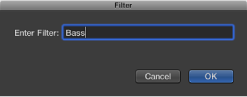

To minimize the number of sampler instruments displayed in the Sampler Instruments pop-up menu, you can use the Find function. This limits the Sampler Instruments pop-up menu to displaying only sampler instrument names that contain the search term.
Choose Find from the Sampler Instruments pop-up menu.
Enter the search term in the Filter dialog.
Choose Clear Find from the Sampler Instruments pop-up menu.
The full Sampler Instruments pop-up menu is displayed, but the search term you typed in the Filter dialog is not cleared. You can return to the limited menu by choosing Enable Find from the Sampler Instruments pop-up menu. This allows you to switch between the two views without re-typing the search term.
Choose Find from the Sampler Instruments pop-up menu again, then enter the search term.