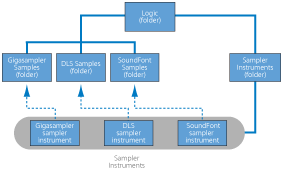

EXS24 mkII recognizes SoundFont2, DLS, and Gigasampler files placed inside the Sampler Instruments folder and converts them into sampler instruments.
You can store your imported sampler instruments in any folder on any of your computer’s hard drives. To access these instruments from the Sampler Instruments pop-up menu, you need to create an alias pointing to the target folder within the ~/Library/Application Support/Logic/Sampler Instruments folder.
To open the Library folder in a Finder window, Option-click the Go menu from the desktop, then click Library.
Copy or move your SoundFont2, DLS, or Gigasampler files into the ~/Library/Application Support/Logic/Sampler Instruments folder.
Choose the SoundFont2, DLS, or Gigasampler file from the Sampler Instruments pop-up menu.
EXS24 mkII automatically converts the chosen file into a sampler instrument, as follows:
A sampler instrument file is created in the Sampler Instruments folder. This contains the file in its original format.
The raw samples associated with the sampler instrument are placed in one of the following folders, depending on the format being converted:
~/Library/Application Support/Logic/SoundFont Samples
~/Library/Application Support/Logic/Gigasampler Samples
~/Library/Application Support/Logic/DLS Samples
The procedure outlined above also applies when you are importing SoundFont2 files. These file types contain multiple sounds in addition to single-instrument files.
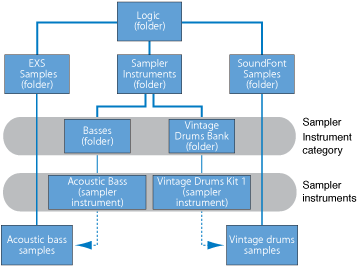
When you load a SoundFont2 Bank into EXS24 mkII, it creates a Bank folder and a Samples folder, named after the SoundFont2 Bank file. The word Bank or Samples is appended to each folder name. A sampler instrument file is automatically created for all sounds in the bank, and placed in the new Bank folder. The Sampler Instruments pop-up menu automatically updates to reflect the new folder hierarchy. All samples associated with the bank are automatically added to a Samples folder inside the SoundFont folder. For example, if you load a SoundFont2 bank file named Vintage Drums, which contains over 50 individual drum kits from several different vintage drum machines, into EXS24 mkII, the following happens:
A new folder named Vintage Drums Bank is created in the ~/Library/Application Support/Logic/Sampler Instruments folder.
A second folder named Vintage Drums Samples is created in the ~/Library/Application Support/Logic/SoundFont Samples folder.
The Sampler Instruments pop-up menu hierarchy is updated and the original Vintage Drums entry is replaced with a Vintage Drums.Bank entry. This new entry is a folder that contains the individual sampler instruments, which can be selected and loaded as usual.
After conversion is complete, the original SoundFont2 or Gigasampler source files can be deleted from the hard disks.