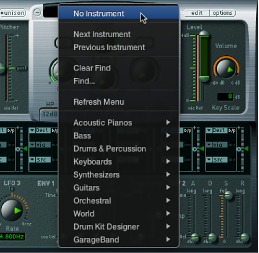
As your sample library grows, the list of sampler instruments also expands. To help you keep the list of sampler instruments manageable, EXS24 mkII provides a simple, flexible file management method.
It is recommended that you copy any sampler instruments and all associated audio files to your hard drive. This provides access to your sampler instruments with no need to find and insert CD-ROM or DVD discs, and it also enables you to organize your sampler instruments to meet your needs. Load times are faster, and you can play back samples that exceed the size of your computer’s RAM by streaming them from your hard disk. This feature is not practical for optical drives.
If you are using Logic Pro X, you can save sampler instruments and associated audio files with the project bundle. This makes it easy to keep all sampler instruments and audio samples in one place.
Organize your sampler instruments into a preferred hierarchy
Create a folder on the desktop—named Basses, for example—and drag it into the target folder.
Drag the sampler instruments you want to move into this newly created folder.
The modified menu structure is reflected when you open the Sampler Instruments pop-up menu.
Note: Use the Refresh Menu command in the Sampler Instruments pop-up menu after changes are made to the folder hierarchy in the Sampler Instruments folder.
The Sampler Instruments pop-up menu displays submenus only for folders that actually contain sampler instrument files. Other folders are not added to the menu. Aliases pointing to folders that contain sampler instrument files outside the Sampler Instruments folders can also be added to the menu. The Sampler Instruments folder itself can be an alias to a folder on a different drive or in another location.
Copy sampler instruments to your hard drive
To open the Library folder in a Finder window, Option-click the Go menu from the desktop, then click Library.
Copy the sampler instrument file into the ~/Library/Application Support/Logic/Sampler Instruments folder.
Copy the associated samples into a folder named Samples in the same folder as the Sampler Instruments folder.
Create a backup of sampler instruments in Logic Pro X
To copy the audio and sampler instrument files of all currently active sampler instruments in the project to a specified file location, use the Backup Audio Files of All Used and Active Instruments of Current Project key command.
Folders for the audio files associated with these sampler instruments are created in the target location.
Tip: You can also do this by saving a project. By default, sampler instruments and samples are saved in the project bundle. For more information, see Logic Pro X Help.