

In Unison mode, up to 64 voices are played when a key is struck. This enables a richer sound, achieved by slightly detuning each voice. This is ideal when you are emulating classic analog synthesizers.
Voices are equally distributed in the panorama field and are evenly detuned. You can use the Random knob to determine the amount of tuning deviation between voices.
Note: The number of voices actually used per note increases with the number of layered sample zones.
Click the Mono or Legato button, depending on the keyboard mode you want to use. See Set the EXS24 mkII keyboard mode.
Click the Unison button.
The intensity of the unison effect depends on the number you set in the Voices field. Increase the Voices value for a fatter sound.
The intensity of detuning—voice deviation—depends on the value you set with the Random knob. See EXS24 mkII pitch parameters.
Click the Poly and Unison buttons.
In Poly/Unison mode, each played note is effectively doubled, or—more correctly—the polyphony value of the Voices parameter is halved. These two voices are heard when you trigger the note. Selecting Poly and Unison has the same effect as setting the EXS24 mkII to Mono and Unison with Voices set to 2, but you can play polyphonically.
Drag the Voices field to determine the maximum number of voices (polyphony) that EXS24 mkII can play.
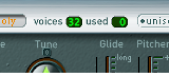
The Used field is a real-time monitor that indicates the number of voices in use when you play the keyboard. If the Voices and Used fields show the same value most of the time (causing voices to drop out), set a higher Voices value.