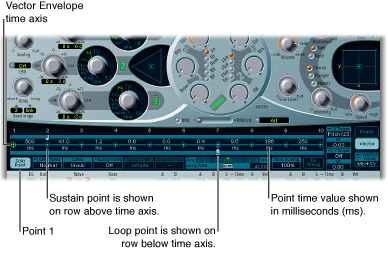

The Vector Envelope time axis runs from left to right.
Up to 16 points can be displayed on the time axis (10 are shown in the figure above). Each point can control the pointer positions of the Triangle and the Planar Pad.
The points are numbered sequentially, from left to right, along the time axis.
There are always at least three points: point 1 is the start point, point 2 is defined as the Sustain point, and point 3 is the end point.
Any point can be declared the Sustain point. If a played note is held for a sufficient length of time and there’s no loop engaged, any envelope movement stops when the Sustain point is reached. The Sustain point value is maintained until the key is released—until the MIDI note-off command.
Any point can be declared the Loop point. The looped area spans the time between the Sustain point and Loop point. In between these points you can create additional points that describe the movements of the pointers in the Planar Pad and Triangle.
The more points you set, the more complex the movements that can be performed.
Click the point to select it.
Once selected, you can edit the point.
Shift-click between two existing points.
The segment that previously existed between the two old points is divided at the clicked position. The sum of the two new segment times is equal to the time of the original undivided segment. This ensures that any points that follow retain their absolute time positions. Existing pointer positions in the Triangle and Planar Pad are fixed, thus ensuring that newly created points don’t affect any previously defined movements.
Control-click the point.
Do one of the following:
Option-click the Triangle.
The pointer is set to the center position of the Triangle, and all oscillators are set to output the same level.
Option-click the Planar Pad.
The pointer is set to the center position of the Planar Pad. Both axis values are set to zero.