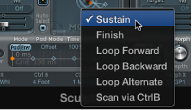

The Sustain mode pop-up menu lets you choose one of the following modes: Sustain, Finish, Loop Forward, Loop Backward, Loop Alternate, and Scan via CtrlB.
When you are in any of the loop modes, the loop always cycles between the loop and sustain envelope handles—the nodes indicated by the L and S icons. The Morph Envelope can, like any envelope, run in one-shot mode—it runs normally, for as long as the note is sustained. It can also run several times, or in an infinite cycle, much like an LFO. You can achieve the latter through the use of loops.
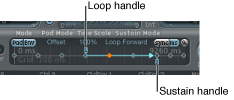
The Loop and Sustain point handles can be grabbed and repositioned. Note that doing so can potentially alter the loop (and the overall morph envelope) length. The loop modes behave as described below:
Finish: The envelope runs in one-shot mode from its beginning to its end—even if the note is released before the envelope has completed. The other loop parameters are disabled.
Loop Forward: The envelope runs to the Sustain point and begins to repeat the section between the Loop point and Sustain point periodically—always in a forward direction.
Loop Backward: The envelope runs to the Sustain point and begins to repeat the section between the Sustain point and Loop start point periodically—always in a backward direction.
Loop Alternate: The envelope runs to the Sustain point and returns to the Loop point and back to the Sustain point periodically, alternating in both a backward and forward direction.
Scan via CtrlB: The timeline position within the envelope is disconnected from normal, real-time operation, enabling you to manually scan the overall time range with the MIDI controller assigned to Ctrl B (in the MIDI Controller Assign section).
Tip: It is also possible to drag the red time position marker.
Note: If one of the three loop modes is selected, and the Loop point is positioned before the Sustain point, the loop remains active until the key is released. Following key release, the envelope then continues beyond the Sustain point, as usual. If the Loop point is positioned after the Sustain point, the loop begins as soon as the key is released, and cycles continuously until the complete voice has finished the amplitude envelope release phase.