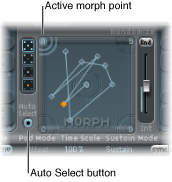

One of the five Morph Pad points (A, B, C, D, and Center) is always selected for editing. This selected point is indicated by two concentric circles that surround it.
When you turn on Auto Select mode, the nearest morph point will be automatically selected when you move the ball in the Morph Pad.
You can also click in the circles around A, B, C, D, or the center, to manually select a Morph Pad point.