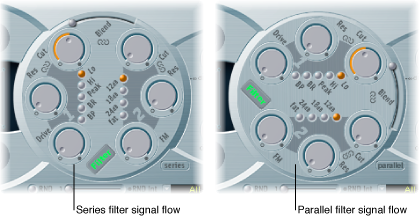

The Filter Configuration button lets you switch between a parallel and series filter routing. When either is chosen, the entire circular filter element rotates, and the positions and direction of the filter controls clearly indicate the signal flow. The button name also changes in each mode.
In the figure to the left, the filters are cabled in series. This means that the signal of all oscillators (combined at the Oscillator Mix Triangle) passes through the first filter, then this filtered signal passes through Filter 2, if Filter Blend is set to 0, the middle position. The output signal of Filter 2 is then sent to the input of the dynamic stage (Amplifier section).
In the figure to the right, the filters are cabled in parallel. If Filter Blend is set to 0, you’ll hear a 50/50 mix of the source signal, routed via Filter 1 and Filter 2. The output signals of the two filters are then sent to the input of the dynamic stage. See Cross-fade between ES2 filters.