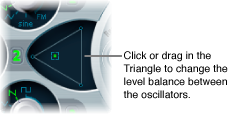

The position of the pointer in the Triangle is described by two parameters—x and y coordinates—which are used when automating the oscillator mix. These parameters, called OscLevelX and OscLevelY, are available as targets in the router.
Drag the pointer in the Triangle to cross-fade—set the level relationships—between the three oscillators. This is self-evident in use. If you move the pointer along one of the Triangle’s sides, it cross-fades between the two closest oscillators, and the third oscillator is muted.
The position of the pointer (x and y coordinates) in the Triangle can also be controlled with the Vector Envelope. Because the Vector Envelope features a loop function, it can be used as a pseudo-LFO with a programmable waveform. For more information about this feature, see Use the Vector Envelope.
Set up a modulation routing as follows: modulation target OscLevelX, source ModWhl. Adjust the intensity.
Set up a second modulation routing as follows: modulation target OscLevelY, source ModWhl. Adjust the intensity. You can choose other sources for these targets.