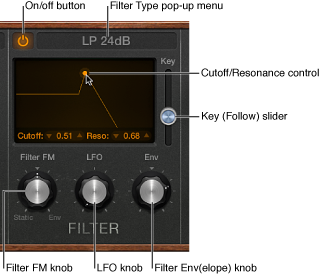

Retro Synth features a flexible filter that can operate as a lowpass, highpass, bandpass, band reject, or peak filter. The filter can subtly, or dramatically, affect the basic tone sent from the oscillators.
Filter use is straightforward. Choose a filter type and set a filter slope (if applicable). Adjust the filter cutoff and resonance controls to sculpt the sound. You can also control the filter cutoff and resonance controls while playing—either manually or by using keyboard position, an envelope, or the LFO to modulate these filter controls automatically. Real-time changes to filter cutoff and resonance can make your performance much more dynamic and interesting. You can do this with MIDI keyboard controllers and with the other filter section controls. See Use Retro Synth modulation and Retro Synth global and controller settings.
Filter parameters
On/off button: Turn the filter section on or off. You will normally have the filter enabled (indicated by the lit button at the top left of the filter section). Disable the filter when adjusting other sound controls because this makes it easier to hear changes.
Filter Type pop-up menu: Choose a filter type from the menu. There are four lowpass filters with different slopes, a highpass, bandpass, band reject, and peak filter available.
LP (lowpass): Allows frequencies that fall below the cutoff frequency to pass. You can choose one of four slopes that change the tonal characteristics of the filter, making it sound brighter, mellow, thinner, or fuller—particularly in the bass end of the sound.
HP (highpass): Allows frequencies above the cutoff frequency to pass. The slope of the highpass filter is fixed at 12 dB/octave.
BP (bandpass): The frequency band directly surrounding the cutoff frequency is allowed to pass. All other frequencies are cut. The Resonance control sets the width of the frequency band. Bandpass is a two-pole filter with a slope of 6 dB/octave on each side of the band’s center frequency.
BR (band reject): The frequency band directly surrounding the cutoff frequency is rejected, but frequencies outside the band can pass. The Resonance control sets the width of the rejected frequency band.
Peak: A peak filter allows the level in a frequency band to be increased. The center of the frequency band is set with the Cutoff control. The width of the band is set with the Resonance control.
Cutoff control: Drag horizontally to set the brilliance of the signal.
In a lowpass filter: the higher the Cutoff frequency is set, the higher the frequencies of signals that are allowed to pass.
In a highpass filter: Cutoff sets the point where low frequencies are suppressed.
In a bandpass, band reject, or peak filter: Cutoff sets the center frequency of the band that is allowed to pass, is suppressed, or is emphasized.
Resonance control: Drag vertically to boost or cut signal portions above, below, or surrounding the cutoff frequency.
Key (Follow) slider: Determine the effect that keyboard pitch (the note number) has on filter cutoff frequency modulation.
At the top position, the filter follows keyboard pitch, resulting in a constant relationship between cutoff frequency and pitch. This mirrors the properties of many acoustic instruments where higher notes sound both brighter in tone and higher in pitch. At the bottom position, the cutoff frequency does not change, regardless of which key (pitch) you strike. This makes the lower notes sound relatively brighter than the higher ones.
Filter FM knob: Set the intensity of filter cutoff frequency modulation with Oscillator 1’s sine wave generator. Positions to the left set the strength of static sine wave modulations. Positions to the right set the strength of envelope-controlled sine wave modulations. The centered (off) position disables filter frequency modulation by Oscillator 1’s sine wave generator.
Note: Oscillator 1’s sine wave generator always generates a sine signal—at the frequency of Oscillator 1.
LFO knob: Set the strength of filter cutoff frequency modulation with the LFO. Positions further away from the centered (off) position make modulation more or less intense. See Retro Synth LFO and Vibrato.
Filter Env(elope) knob: Set the strength of filter cutoff frequency modulation with the Filter Envelope. Positions further away from the centered (off) position make modulation more or less intense. See Retro Synth envelopes.