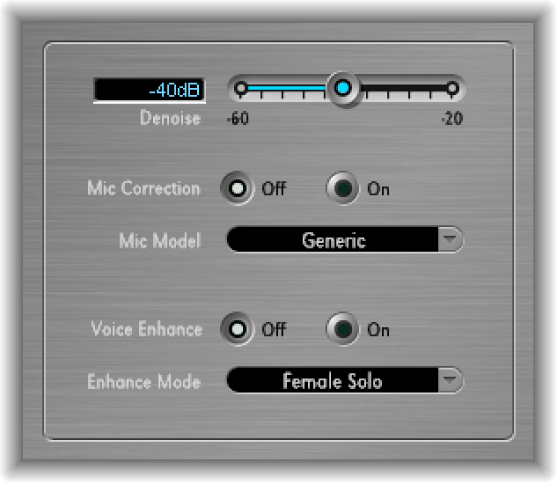

You can use Speech Enhancer to improve speech recordings made with the computer internal microphone, if applicable. It combines denoising, advanced microphone frequency remodeling, and multiband compression.
Speech Enhancer parameters
Denoise slider and field: Determine the noise floor in the recording, from –60 dB to –20 dB, and thus the amount of noise reduction required. Settings toward –60 dB allow more noise to pass; settings toward –20 dB increasingly suppress background noise but also proportionately increase artifacts.
Mic Correction Off/On buttons: Click the On button to improve the frequency response of recordings made with your built-in microphone. This can create the impression that a more expensive microphone was used.
Mic Model pop-up menu: Choose a microphone model to compensate for tonal characteristics of specific built-in Mac microphones.
Note: You can use Speech Enhancer with other microphones as well, but microphone correction models are provided only for built-in Mac and iSight microphones. If you are using a non-Apple microphone, choose Generic from the Mic Correction pop-up menu.
Voice Enhance Off/On buttons: Turn the Voice Enhance multiband compression circuit off or on.
Enhance Mode pop-up menu: When Voice Enhance is active, choose a setting that makes the recorded voice louder and more intelligible.
(Female or Male) Solo: Choose when the recorded signal consists of a vocal only.
(Female or Male) Voice Over: Choose when the recorded signal contains both a vocal performance and a musical or atmospheric bed.