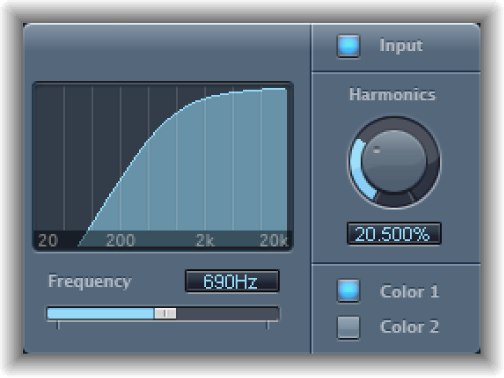

Exciter generates high frequency components that are not part of the original signal. It does this by utilizing a nonlinear distortion process that resembles the one used to produce overdrive and distortion effects.
Unlike this process, however, the Exciter distortion process involves passing the input signal through a highpass filter before feeding it into the harmonics (distortion) generator. Artificial harmonics are thus added to the original signal, and these added harmonics contain frequencies at least one octave above the threshold of the highpass filter. The distorted signal is then mixed with the original, dry signal.
You can use Exciter to add life to recordings, particularly audio tracks with a weak treble frequency range. You can also use Exciter to enhance guitar tracks.
Exciter parameters
Frequency display: Shows the frequency range used as the source signal for the excite process.
Frequency slider and field: Set the cutoff frequency of the highpass filter. The input signal passes through the filter before (harmonic) distortion is introduced.
Input button: Click to mix the original (pre-effect) signal with the effect signal. If you turn off input, only the effect signal is heard.
Harmonics knob and field: Set the ratio between the effect and the original signals. If the Input button is turned off, this parameter has no effect.
Note: In most cases, it is preferable to select higher Frequency and Harmonics values, because human ears cannot easily distinguish between the artificial and original high frequencies.
Color 1 and 2 buttons: Click Color 1 to generate a less dense harmonic distortion spectrum, or Color 2 to generate a more intense harmonic distortion.
Note: Color 2 also introduces more intermodulation distortions, which can result in unpleasant artifacts.