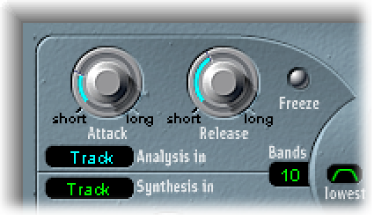

The parameters in the Analysis In section determine how the input signal is analyzed and used by EVOC 20 TrackOscillator.
Analysis In parameters
Attack knob: Determine how quickly each envelope follower—coupled to each analysis filter band—reacts to rising signals.
Release knob: Determine how quickly each envelope follower—coupled to each analysis filter band—reacts to falling signals.
Freeze button: Hold the current analysis sound spectrum indefinitely. When Freeze is enabled, the analysis filter bank ignores the input source, and the Attack and Release knobs have no effect.
Bands field: Set the number of frequency bands analyzed and then used by the synthesis engine. Up to 20 bands can be used.
Analysis In pop-up menu: Choose the analysis signal source.
Track: Uses the input audio signal of the channel strip the EVOC 20 TrackOscillator is inserted into as the analysis signal.
SideCh(ain): Uses a side chain as the analysis signal. You choose the side-chain source channel strip from the Side Chain pop-up menu in the upper-right corner of the plug-in window.
Note: If Side Chain is chosen and no Side Chain channel strip is assigned, the EVOC 20 TrackOscillator reverts to Track mode.