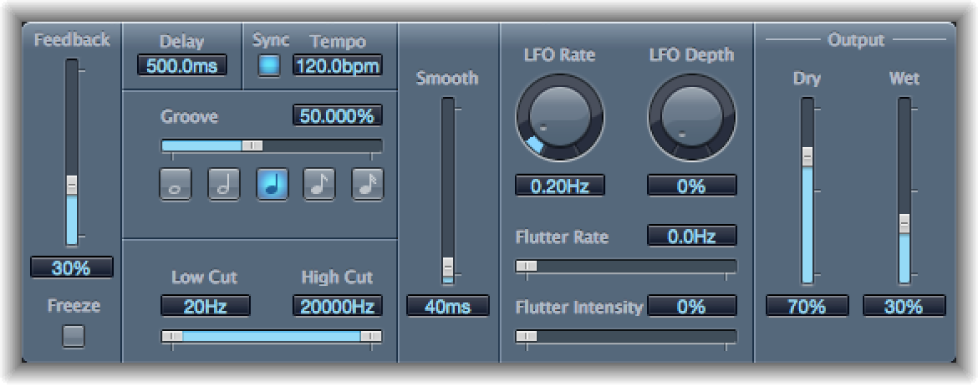

Tape Delay simulates the sound of vintage tape echo machines. It can run at a free rate or can be synchronized with the project tempo. The effect is equipped with a highpass and lowpass filter in the feedback loop, making it easy to create authentic dub echo effects. Tape Delay also includes an LFO for delay time modulation. This can be used to produce chorus effects, even on long delays.
Delay parameters
Feedback slider: Set the amount of delayed and filtered signal that is routed back to the input. Set to the lowest possible value to generate a single echo. Set to 100% to endlessly repeat the signal. The levels of the original signal and taps (echo repeats) tend to accumulate and may cause distortion. Use the internal tape saturation circuit to make these overdriven signals sound pleasant.
Freeze button: Capture current delay repeats and sustain them until turned off.
Delay Time field: Set the delay time in milliseconds. This parameter is dimmed when you synchronize the delay time to the project tempo.
Sync button: Synchronize delay repeats with the project tempo (including tempo changes). The current tempo is shown in the field to the right.
Groove slider and field: Set the proximity of every second delay repeat to the absolute grid position. Put another way, set how close every second delay repeat is. A setting of 50% means that every delay has the same delay time. Settings below 50% result in every second delay being played earlier in time. Settings above 50% result in every second delay being played later in time.
Note buttons: Set the grid resolution for the delay time.
Low/High Cut sliders and fields: Cut frequencies below the Low Cut value and above the High Cut value from the source signal. You can shape the sound of taps (delay repeats) with the highpass and lowpass filters. The filters are located in the feedback circuit, which means that the filtering effect increases in intensity with each delay repeat. If you want an increasingly muddy and confused tone, move the High Cut slider toward the left. For ever thinner echoes, move the Low Cut slider toward the right. If you can’t hear the effect, check the Dry and Wet controls and the filter settings.
Smooth slider and field: Even out the LFO and flutter effect.
LFO Rate knob and field: Set the speed of the LFO.
LFO Depth knob and field: Set the amount of LFO modulation. A value of 0 turns off delay modulation.
Flutter Rate/Intensity sliders and fields: Simulate the speed irregularities of the tape transports used in analog tape delay units.
Flutter Rate: Drag to set the speed variation.
Flutter Intensity: Drag to determine the intensity of the effect.
Dry/Wet sliders and fields: Independently control the amount of original and effect signal.
Distortion Level slider and field (Extended Parameters area): Set the level of the distorted tape saturation signal. Higher values produce no additional audible distortion. Lower values result in an aggressive distortion. This behavior is influenced by high Feedback values which result in eventual distortion, irrespective of the Distortion Level value. That said, aggressive distortion and signal breakup is achieved far more rapidly when low Distortion Level values are used.