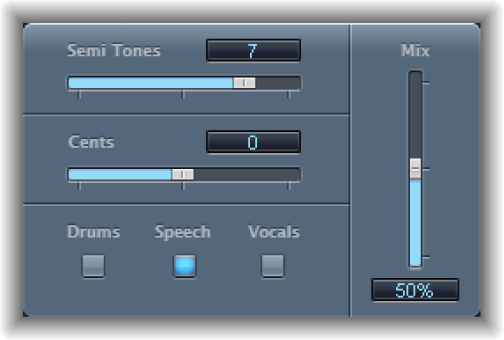

Pitch Shifter provides a simple way to combine a pitch-shifted version of the signal with the original signal. Use pitch shifting to achieve the best results.
Semi Tones slider and field: Set the pitch shift value in semitones.
Cents slider and field: Control detuning of the pitch shift value in cents (1/100th of a semitone).
Drums, Speech, and Vocals buttons: Set one of three optimized algorithms for common types of audio material. Choose from:
Drums: Maintains the groove (rhythmic feel) of the source signal.
Speech: Provides a balance between both the rhythmic and harmonic aspects of the signal. This is suitable for complex signals such as spoken-word recordings, rap music, and other hybrid signals such as rhythm guitar.
Vocals: Retains the intonation of the source, making it well-suited for signals that are inherently harmonic or melodious, such as string pads.
Mix slider and field: Set the balance between the effect and original signals.
Timing pop-up menu (Extended Parameters area): Choose how timing is derived.
Preset: Follows the selected algorithm.
Auto: Analyzes incoming audio.
Manual: Uses the settings of the Delay, Crossfade, and Stereo Link parameters.
Note: The following three parameters are active only when Manual is chosen from the Timing pop-up menu.
Delay slider and field (Extended Parameters area): Set the amount of delay applied to the input signal. The lower the frequencies of the input signal, the higher (longer) a delay time is required—to effectively pitch shift the signal.
Crossfade slider and field (Extended Parameters area): Set the range (shown as a percentage of the original signal) used to analyze the input signal.
Stereo Link buttons (Extended Parameters area): Click Inv. to swap (invert) the stereo channel signals, with processing for the right channel occurring on the left, and vice versa. Click Normal to leave the signal as it is.