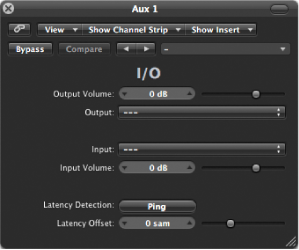

I/O utility enables you to use external audio effects units, similar to using internal effects.
Note: I/O utility is not practical unless you are using an audio interface that provides discrete inputs and outputs, either analog or digital, that are used to send signals to and from the external audio effects unit.
I/O utility parameters
Output Volume field and slider: Adjust the level of the output signal.
Output pop-up menu: Choose the output, or output pair, of your audio hardware.
Input pop-up menu: Choose the input, or input pair, of your audio hardware.
Note: The Input pop-up menu is visible only when an audio interface with multiple inputs is active.
Input Volume field and slider: Adjust the level of the input signal.
Latency Detection (Ping) button: Detect the delay between the selected output and input. Following detection, any delay is automatically compensated for.
Note: You can obtain the most accurate reading by bypassing any latency-inducing plug-ins on the track.
Latency Offset field and slider: Displays the value for the detected latency between the selected output and input in samples. You can also use this slider to offset the latency manually.
Connect an output of your audio interface with the input on your effects unit, and connect the output of your effects unit with an input on your audio interface.
Note: These can be either analog or digital connections, depending on the features of your audio interface and effects unit, and each connection can be either an output or an output pair.
Click an Insert slot of an aux channel strip that is being used as a bus send/return, and choose Utility > I/O.
In the I/O utility window, choose the Outputs and the Inputs of the audio hardware that your effects unit is connected to.
Route the signals of any channel strips that you want to process to the bus (aux channel strip) chosen in step 3, and set appropriate Send levels.
Adjust the Input Volume and Output Volume sliders as required in the I/O utility window.
Click the Latency Detection (Ping) button if you want to detect and compensate for any delay between the selected output and input.
When you start playback, the signals of any channel strips routed to the aux channel chosen in step 3 are processed by the external effects unit.