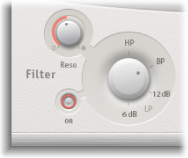

Space Designer’s filter provides control over the timbre of the reverb.
You can select from several filter types and also have envelope control over the filter cutoff, which is independent of the volume envelope. Changes to filter settings result in a recalculation of the impulse response rather than a straight change to the sound as it plays through the reverb.
The main filter parameters are located in the lower-left corner of the interface.
Main filter parameters
Filter On button: Turn the filter section on or off.
Filter mode knob: Set the filter mode.
6 dB (LP): Bright, general-purpose lowpass filter mode that retains the top end of most material while still providing some filtering.
12 dB (LP): Warm, lowpass filter mode without drastic filter effects that smooths out bright reverbs.
BP: 6 dB per octave bandpass design that reduces the low and high ends of the signal, leaving the frequencies around the cutoff frequency intact.
HP: 12 dB per octave/two-pole highpass design that reduces the level of frequencies that fall below the cutoff frequency.
Resonance knob: Emphasize frequencies above, around, or below the cutoff frequency. The impact of the resonance knob on the sound is highly dependent on the chosen filter mode, with steeper filter modes resulting in more pronounced tonal changes.