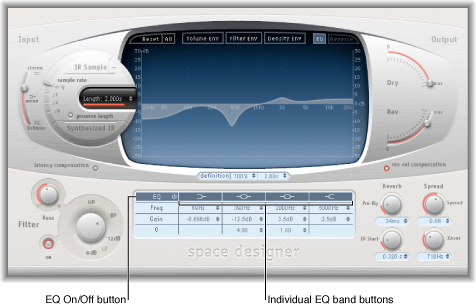

Space Designer has a four-band EQ consisting of two parametric mid-bands plus two shelving filters (one low shelving filter and one high shelving filter). You can edit the EQ parameters numerically in the parameter bar or graphically in the main display.
EQ On/Off button: Turn the entire EQ section on or off.
EQ band buttons: Turn individual EQ bands on or off.
Frequency fields: Set the frequency for the selected EQ band.
Gain fields: Cut or boost the selected EQ band.
Q fields: Set the Q factor for the two parametric bands. The Q factor can be adjusted from 0.1 (very narrow) to 10 (very wide).
Enable the EQ and one or more bands with the EQ On/Off and EQ band buttons in the top row of the parameter bar.
Move the pointer horizontally over the main display. When the pointer is in the access area of a band, the corresponding curve and parameter area are automatically highlighted and a pivot point is displayed.
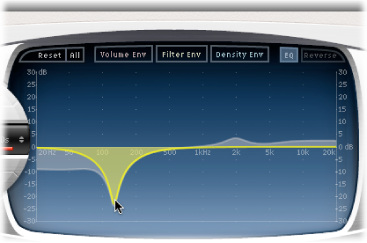
Drag horizontally to adjust the frequency of the band.
Drag vertically to increase or decrease the Gain of the band.
Vertically drag the highlighted pivot point of a parametric EQ band to raise or lower the Q value.