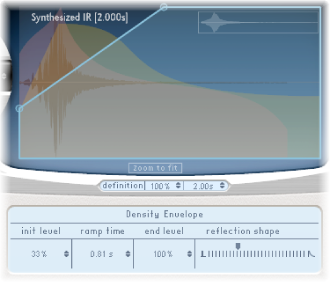

The density envelope allows you to control the density of the synthesized impulse response over time. You can adjust the density envelope numerically in the parameter bar, and you can edit the Init Level, Ramp Time, and End Level parameters using the techniques described in Edit Space Designer envelope parameters.
Note: The density envelope is available only in Synthesized IR mode.
Density envelope parameters
Init Level field: Set the initial density (the average number of reflections in a given period of time) of the reverb. Lowering the density levels results in audible reflections patterns and discreet echoes.
Ramp Time field: Adjust the time between the Initial and End Density levels.
End Level field: Set the density of the reverb tail. If you select an End Level value that is too low, the reverb tail sounds grainy. The stereo spectrum might also be affected by lower values.
Reflection Shape slider: Determine the steepness (shape) of early reflection clusters as they bounce off the walls, ceiling, and furnishings of the virtual space. Small values result in clusters with a sharp contour, and large values result in an exponential slope and a smoother sound. This is handy when recreating rooms constructed of different materials. Reflection Shape, in conjunction with suitable settings for the envelopes, density, and early reflection, will assist you in creating rooms of almost any shape and material.