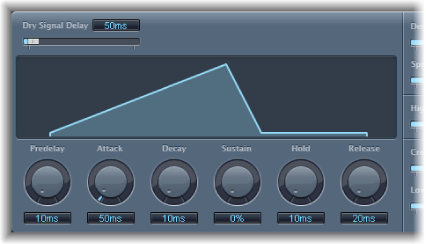

EnVerb provides the following time parameters.
EnVerb time parameters
Dry Signal Delay slider and field: Determine the delay of the original signal. You can hear the dry signal only when the Mix parameter is set to a value other than 100%.
Graphic display: Shows changes to the reverb shape when knobs below the display are adjusted.
Predelay knob and field: Set the time between the original signal and the start point of the reverb attack phase—the very beginning of the first reflection.
Attack knob and field: Set the time it takes for the reverb to climb to its peak level.
Decay knob and field: Set the time it takes for the level of the reverb to drop from its peak to the sustain level.
Sustain knob and field: Set the level of the reverb that remains constant throughout the sustain phase. It is expressed as a percentage of the full-scale volume of the reverb signal.
Hold knob and field: Set the duration of the reverb sustain phase.
Release knob and field: Set the time it takes for the reverb to fade out completely, after the sustain phase.