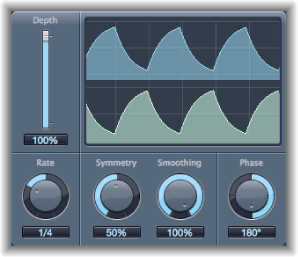

Tremolo modulates the amplitude of the incoming signal, resulting in periodic volume changes. Tremolo is commonly used in vintage guitar combo amps, where it is sometimes incorrectly referred to as vibrato. The graphic waveform display shows all the parameters except Rate.
Tremolo parameters
Depth slider and field: Determine the modulation amount.
Waveform display: Shows the resulting waveform.
Rate knob and field: Set the frequency of the LFO.
Symmetry/Smoothing knobs and fields: Change the shape of the LFO waveform.
If Symmetry is set to 50% and Smoothing to 0%, the LFO waveform becomes rectangular. The timing of the highest volume signal is then equal to the timing of the lowest volume signal, with the switch between both states occurring abruptly.
Phase knob and field: Control the phase relationship between individual channel modulations in stereo or surround signals. At 0, modulation values are reached simultaneously for all channels. At values of 180 or −180, there is the greatest possible distance between the modulation phases of the channels.
Distribution pop-up menu: Choose how phase offsets between individual channels are distributed in the surround field. Choose from: circular, left↔right, front↔rear, random, and new random. Available only in surround instances.
Offset slider and field (extended parameter): Set the amount that the modulation (cycle) is shifted to the left or right, resulting in small or large tremolo variations.