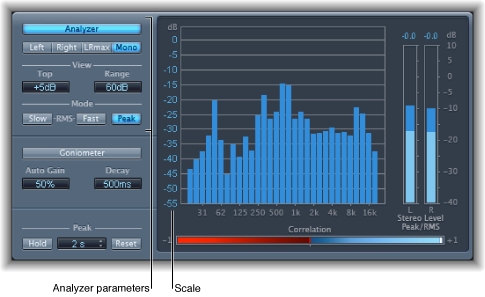

In Analyzer mode, MultiMeter’s main display shows the frequency spectrum of the input signal as 31 independent frequency bands. Each frequency band represents one-third of an octave. The Analyzer parameters are used to activate Analyzer mode and to customize the way that the incoming signal is shown in the main display.
MultiMeter Analyzer parameters
Analyzer button: Switch the main display to Analyzer mode.
Left, Right, LRmax, and Mono buttons: Determine the channels shown in the Analyzer results in the main display.
Left or Right: Displays the left or right channels.
LRmax: Displays the maximum level of the stereo inputs.
Mono: Displays the spectrum of the mono sum of both (stereo) inputs.
View fields: Change the value display in the Analyzer by setting the maximum level (Top) and the overall dynamic range (Range).
Mode buttons: Determine how levels are displayed. You can choose Peak, Slow RMS, or Fast RMS characteristics.
The two RMS modes show the effective signal average and provide a representative overview of perceived volume levels.
The Peak mode shows level peaks accurately.
Scale (shown in main display): Indicates the scale of levels. Drag the scale vertically to adjust. Changing the scale is useful when you are analyzing highly compressed material because it makes it easier to identify small level differences.